Page History
Specify the default communications information to allow the Slave Visual LANSA system to connect to the IBM i Master System. This dialog is only displayed if an IBM i Slave system is being installed. Your LANSA or System 's Administrator should provide you with the appropriate connection details.
| Note |
|---|
| Note: This connection information will be used by the Visual LANSA System during the Initialization phase of the installation. |
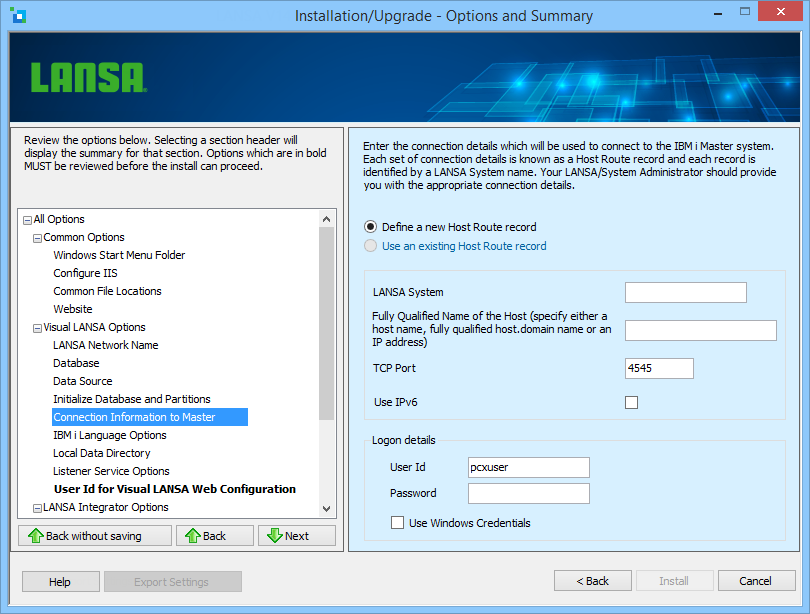
Each set of connection details is known as a Host Route and each Host Route record is identified by a System Name.
...
Specify a new Host Route record. The new record will be added to the table used by the LANSA Communications Administrator. If you select this option, you will need to provide the following details
System Name
Used to identify the Host Route record.
Fully Qualified Name of the Host
Specify the name or address of the IBM i Master. This will either be the machine name, the fully qualified name (that is, host.domain), or the Master's IP address (for example, 12.4.1.56).
Connection Id
Specify the TCP/IP port number that has been assigned to the LANSA Listener.
The default port number is 4545.
Use IPv6
Specifies whether to use the host's IPv6 address to establish the connection. When you leave the Fully Qualified Name of the Host entry box, the install installation will determine if the host name hostname resolves to an IPv4 and/or IPv6 address. If the host name hostname resolves to both IPv4 and IPv6 addresses, then you will be asked to select your preference.
...
If the connection is already defined, select the Host Route from the drop-down list. The list is based on the Host Routes used by the LANSA Communications Administrator.
...
After the installation is complete, the Visual LANSA System & partitions will be initialized when the connection is made to the LANSA for i server. This will download the required LANSA System Definitions. Don't forget that the LANSA on the IBM i must be at the same version as the Visual LANSA Slave System being installed.
User Id
Enter the User Name or user profile to log on to the selected Master server.
Password
Enter the password associated with the Master's User Name or user profile.
...
When this option is selected, the User Id and Password will be disabled. The User Id and Password that were used to log in to the current Windows session will be used instead. Before you use this option, review the information about Windows credentials in Use Windows Credentials in the Administrator's Guide.