Page History
...
| Info |
|---|
| A list of supported databases, for the Visual LANSA version you are installing, is in the Supported Platforms document on the LANSA web sitewebsite. |
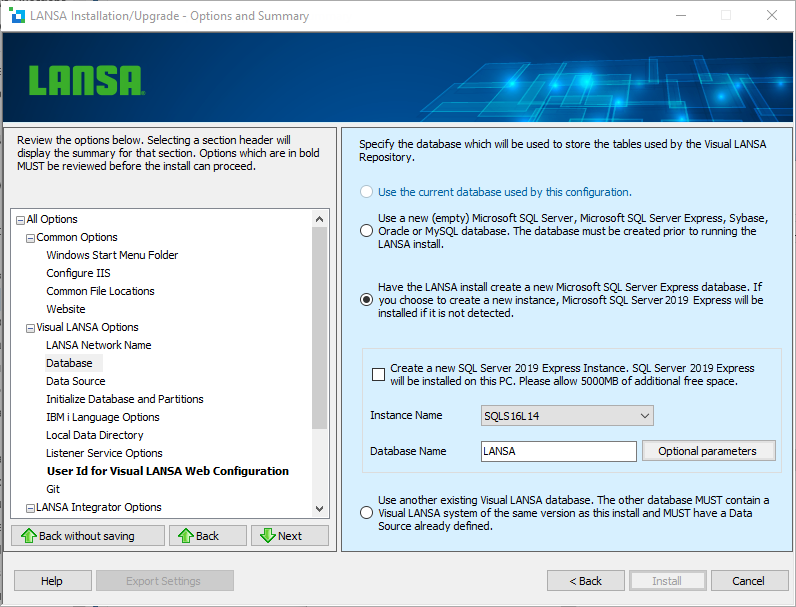
Select one of the following options:
...
This option is not used for a new Install. It is the most likely option when doing an Upgrade or a Modify/Repair.
OR
Use a new Microsoft SQL Server, Sybase, Oracle, or MySQL database
LANSA supports the use of these three database products. LANSA will create the database objects it requires (tables, indexes, and so on) but it will not create and configure the database. If you select this option, the database must be created and configured prior to the Visual LANSA install running.
...
'innodb_file_format'=Barracuda


'innodb_file_format_max'=Barracuda


'innodb_large_prefix'=ON


'sql_mode'=<existing values>,PAD_CHAR_TO_FULL_LENGTH (note comma as the delimiter)
...
This database must be OFA compliant. Supported Oracle versions are also included in the list of supported databases, for the Visual LANSA version you are installing, in the Supported Platforms document on the LANSA web sitewebsite.
OR
Create a new Microsoft SQL Server Express Instance
Microsoft SQL Server 2019 Express is included on in the Visual LANSA installation media. Microsoft SQL Server Express is a free version of Microsoft SQL Server. Refer to Microsoft documentation for the differences between Microsoft SQL Server and Microsoft SQL Server Express.
If you select this option, the new database can be created in an existing instance or a new instance. If no SQL Server Express instances exist on the workstation, this option will be selected by default and made read-only so that SQL Server Express is installed and an instance created. An instance must exist for a database to be created. If one or more instances already exist then you may choose to use one of these existing instances or have the Visual LANSA install to create a new one.
To change the disk location of the instance or to change the password for the default administrator user, press the Database Instance Optional Parameters button next to the instance name.
To change the disk location of where the database will be created, press the Database Optional Parameters button next to the Database Name.
Note 5: When the Visual LANSA install creates a new Microsoft SQL Server Express instance, it will configure it to use 250mb 250 MB maximum memory. You can modify the memory usage using SQL Server Management Studio. See Microsoft SQL documentation for details.
...
This indicates that the target database already exists and contains an existing LANSA system. The LANSA system must be the same version as the LANSA version being installed. This option should only be used if moving the LANSA configuration associated with the database to a different location on your hard drive or moving to a different PC. This option should not be used to create a scenario where multiple local LANSA configurations (configurations on this PC) connect to the same database. LANSA strongly recommends that each configuration has its own database unless it is being setup set up as a a Network or Local Client or 3.3.5 Client to an Independent Database Server.