Page History
Initializing the Partition makes the partition usable. It imports System Fields, Component primitives, and so on. It also ensures that the execution environment is able to build objects for the partition.
...
To avoid a long initialization, choose only to initialize those Partitions that you plan to use immediately and select only the options that you want to use in every Partition. For example, imports such as the Visual LANSA Framework contain a large amount of data. So, if one Partition was to take 10 minutes to initialize, 6 Partitions will take 1 hour. Further Partition Initialization can be done from within LANSA so there is no need to install them all now or run the install again.
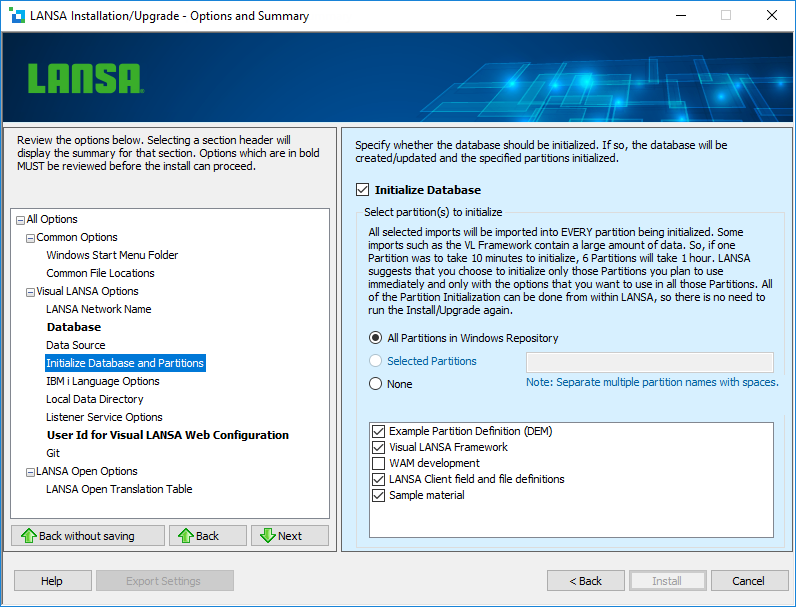
Initialize Database
Select this option if the database is to be initialized. If selected, the database tables will be created/updated and the specified Partitions initialized.
...
If you select this option, all current Partitions in the Windows repository will be initialized. If installing to a new database, this option will be disabled. In this case, after the installation is complete, you will create partitions and initialise initialize them during the Visual LANSA log-on process.
Selected Partitions
...
This option imports an example User Id, Password, and Task to give you access to Visual LANSA. When you are in Visual LANSA, you can add others and delete these examples.
Note that the password is context-sensitive.
Optional Imports
Visual LANSA Framework
Select this option to install the Visual LANSA Framework into the specified partition(s). For details, refer to What is the Visual LANSA Framework? in the Visual LANSA Framework Guide.
WAM development
Select this option to enable WAM development for the specified partition(s).
LANSA Client field and file definitions
Select this option to import field and file definitions for use with LANSA Client.
Sample material
Selecting this option will import relevant demonstration packages into the current Partition.
The sample material includes the Personnel System files that are used for a number of Visual LANSA examples and demonstrations.
Some of the objects included are:
- DirectX demonstration data and applications
- Web sample applications
- Samples and examples
- Sample table data & definitions
...