Page History
The simplest way to apply a theme to an application is to use the Theme tab and select a theme from those listed when you select the Custom option on the Theme dropdown. The Themes listed can be supplied Themes or a Theme that you have created yourself.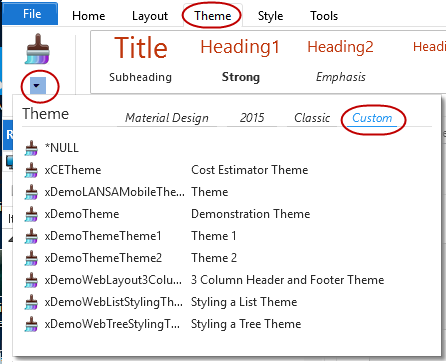
When a Theme is selected it is applied to the Theme property.
Begin_Com Role(*EXTENDS #PRIM_WEB) Theme(#xDemoTheme)
Themes can also be applied programmatically.
#Com_owner.Theme <=
...
#xDemoTheme Once the Theme is applied, the application will immediately adopt the styles defined.