Page History
...
If the Web Page compiled successfully three files would be generated into your partition web directory …\X_WIN95\X_LANSA\x_<partition>\web\vl :
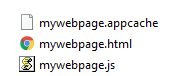
The HTML file is what is kicked off in the browser when you executed the Web Page so open the HTML file in a text editor and have a look inside.
Don't panic at this point, you don't need to know anything about HTML to use web with Visual LANSA. This is just a one off look inside to get a basic understanding of how it works.
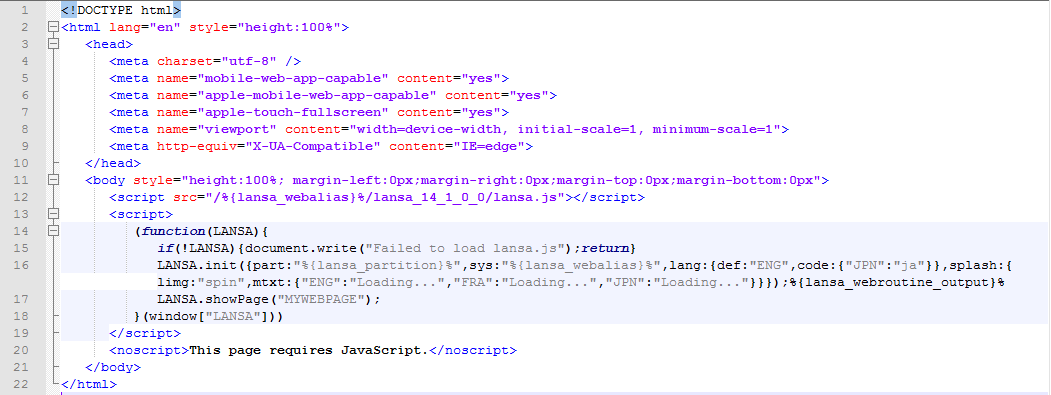
First up, looking at the code between the <script></script> tags notice there is no static HTML to define your page but instead the generated code triggers the load of the LANSA runtime (lansa.js) and instructs it to show the page you just compiled. The LANSA runtime will subsequently load the JavaScript for your page (mywebpage.js) and run the code that constructs the user interface.
The directory the LANSA runtime is loaded from, in this case …/lansa_14_1_0_0, determines the version of the JavaScript runtime that is loaded.

A new version of the runtime will be supplied with major releases of LANSA. To take advantage of the latest runtime features you will need to recompile your Web Pages to regenerate the HTML so that it loads the latest runtime.
...
Don't worry about the cache manifest file (mywebpage.appcache) at this point in time, other than to note this is a text file that lists the resources the browser should cache for offline access. You'll come back to this concept in Offline Accessibility.