Page History
The Configure Data/Application Server page allows you to specify Web Function related settings for your system.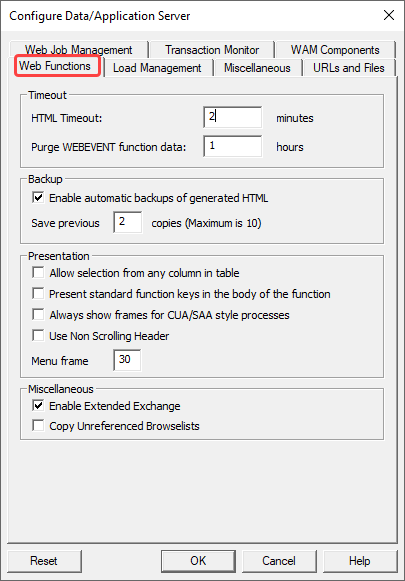
HTML Timeout (minutes)
The Transaction Monitor will terminate LANSA jobs that remain inactive after the timeout period has elapsed.
...
Please note that the time of this timeout must be lower than the Response Timeout for an IBM i Web Server. Refer to Configure IBM i Web Server in the LANSA for IBM i Administrators Guide and Web Server System (IBM i only) for the equivalent IBM i settings.
Purge WEBEVENT function data (hrs)
The information needed to restart WEBEVENT functions will be held for the time you specify here. When a WEBEVENT function has been inactive for longer than this time, the data will be deleted. This means WEBEVENT functions that have been inactive for up to this time limit may be restarted with no loss of data.
The default period is 1 hour (stored in the data area in seconds).
Enable automatic backups of generated HTML
If you select this option, LANSA will save the current HTML as a previous version when it generates HTML for functions.
...
The default setting is 'selected'.
Save previous copies
Enter the number of backup copies of your generated HTML that you want to be saved. The maximum number is 10. Note that the number of HTML backups retained will affect the size of the LANSA internal tables used to store the generated HTML.
...
You can access these saved versions of the generated HTML via the LANSA Web Function Editor.
Allow selection from any column in table
If set to 'Y', LANSA Web will allow you to click on any column in the browse list to make a selection. (The 'Y' setting causes additional data to be sent from LANSA Web to the browser, to make each of the columns selectable.)
...
The default setting is 'N'.
Present standard function keys in the body of the function
Enter 'Y', to have any buttons that are displayed in the Standard Header also be displayed in the body of the function.
...
The default setting is 'N'.
Always show frames for CUA/SAA style processes
When set to 'Y', frames will be persistent in LANSA Web. This means that displays in LANSA functions will be displayed in the Client area of the frameset.
...
The default setting is 'N'.
Use Non Scrolling Header
When set to 'Y', LANSA Web will generate a separate frame for a non-scrolling header style for all the LANSA functions, which have been Web, enabled. The non-scrolling header style provides you with a separate frame that shows the STDHEADER page. The body of the function will be displayed in a separate frame. This feature allows you to scroll through the body of the function, with the buttons in the STDHEADER page displayed in a separate and static frame.
The default value is 'N'.
Menu frame width
This is the size of the Menu frame expressed as a percentage of the width of the browser, when frames are displayed in LANSA Web.
The default setting is 30.
Enable Extended Exchange (IBM i only)
The standard LANSA exchange list is used by LANSA Web to pass values between WEBEVENT functions. The exchange list has a limit of 2000 bytes. Functions that use large text areas quite often exceed the 2000 byte limit.
...
Functions compiled when this flag is 'Y' will contain code to alert the Web controller to pass values to the function via the extended exchange.
The default value is 'N'.
Copy Unreferenced Browselists
LANSA now correctly copies only referenced browselists. However, if you enable this option, LANSA will copy un-referenced browselists as well.
The default value is 'N'.