Page History
...
Summary of Process/Function movement with various system settings
Object | Task | Check Out Mode: U=update, R=read only | *TTG6FUN CLOCKING | DC@A07 check-in unlocking flags | Checked In | Locked to task in IBM i after Check In | Set to read only in VL |
|---|---|---|---|---|---|---|---|
Process | Normal Task | U | OFF | N/A | Y | Y | N |
Process | Normal Task | R | OFF | N/A | Y | Y | unchanged |
Process | Normal Task | U | ON | N/A | Y | Y | N |
Process | Normal Task | R | ON | N/A | N | Unchanged | Unchanged |
Process | *N | U | OFF | N-- | Y | N | N |
Process | *N | R | OFF | N-- | Y | N | Unchanged |
Process | *N | U | OFF | Y-- | Y | N | Y |
Process | *N | R | OFF | Y-- | Y | N | unchanged |
Process | *N | U | ON | N-- | Y | N | N |
Process | *N | R | ON | N-- | N | N | Unchanged |
Process | *N | U | ON | Y-- | Y | N | Y |
Process | *N | R | ON | Y-- | N | N | Unchanged |
| Note |
|---|
| Note: *U and *T tasks perform the same way. |
Object | Task | Check Out Mode: U = update, R = read only | *TTG6FUN CLOCKING | DC@A07 check-in unlocking flags | Checked In | Locked to task in IBM i after Check In | Set to read only in VL |
|---|---|---|---|---|---|---|---|
Process | *U & *T | U | OFF | -NN | Y | Y | N |
Process | *U & *T | R | OFF | -NN | Y | Y | unchanged |
Process | *U & *T | U | OFF | -YY | Y | N | Y |
Process | *U & *T | R | OFF | -YY | Y | N | Unchanged |
Process | *U & *T | U | ON | -NN | Y | Y | N |
Process | *U & *T | R | ON | -NN | N | unchanged | Unchanged |
Process | *U & *T | U | ON | -YY | Y | N | Y |
Process | *U & *T | R | ON | -YY | N | unchanged | unchanged |
If the process and function are placed in Visual LANSA by propagation, they will be read only.
...
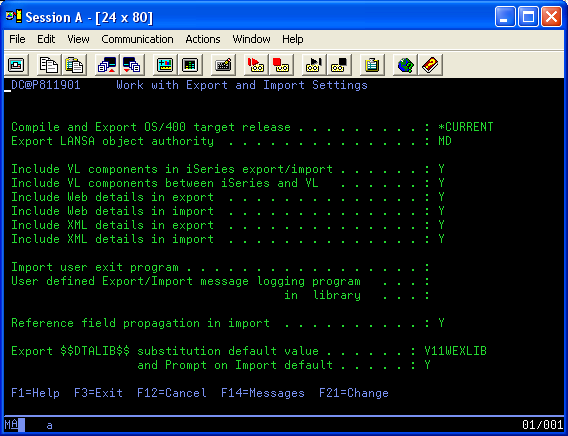
WEBEVENT applications require special consideration as there are several HTML definitions associated with a process which can cause overwriting problems (e.g. LAYOUT, MENU, etc). Various web settings for Import and Export processing are available on the IBM i Master. These are described in Export and Import settings in the LANSA for i User Guide. These settings can be set as required to restrict the movement of associated HTML pages.
For example, you may want to move the HTML for the function but not the HTML for the process. This can be achieved by moving the Process as "Read only". The function can be moved for "Update". This has the effect of checking out/ in the function without the process. This can also be achieved by using the Lock functions to same task as process setting. The HTML definitions included in the import / export are determined by the Import and Export system settings.
| Note |
|---|
| Note: When Lock functions to same task as process setting is set or the Check-in Unlocking or Export and Import settings are changed, the system definition in Visual LANSA must be refreshed and the host monitor stopped and restarted. Ensure that the host monitor has stopped before restarting. |