Page History
Wiki Markup
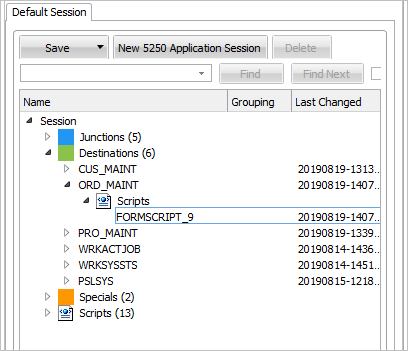
Select the script of ORD_MAINT – note the name FORMSCRIPT_9 may be different in your system: !worddavaf485e25f57cd86bb5b0fc63f3f1b1cc
Locate the .png|height=32,width=32! Locate the vHandle_BUTTONCLICK: function(sButton) script block.
Add the JavaScript code to handle a click on the Align button.
...
case
...
KeyF24:
...
...
/*
...
Signal
...
this
...
event
...
and
...
pass
...
additional
...
information
...
*/
...
...
AVSIGNALEVENT("CUS_MAINT_ALIGN","FRAMEWORK",objListManager.NKey2
...
[0
...
],GETVALUE("ADDRESS"),GETVALUE("CITY"),GETVALUE("POSTALCODE"));
AVSIGNALEVENT is a RAMP API that allows you to broadcast an event across active RAMP screens and active Framework filters. For more information please refer to [<span style="color: #0000ee"><span style="text-decoration: underline; ">AVSIGNALEVENT Function</span></span>|lansa050_2375.htm#_Ref129503987]. Since the only keys allowed in this screen are Enter and F24, you can delete the other case statements so that the entire SWITCH block looks like this: switch (sButton) \{ case KeyEnter: SENDKEY(KeyEnter); break; case KeyF24: /* Signal this event and pass additional information */ to AVSIGNALEVENT Function.
Since the only keys allowed in this screen are Enter and F24, you can delete the other case statements so that the entire SWITCH block looks like this:
switch (sButton)
{
case KeyEnter:
SENDKEY(KeyEnter);
break;
case KeyF24:
/* Signal this event and pass additional information */
AVSIGNALEVENT("CUS_MAINT_ALIGN","FRAMEWORK",objListManager.NKey2
...
[0
...
],GETVALUE("ADDRESS"),GETVALUE("CITY"),GETVALUE("POSTALCODE"));
...
...
break;
...
...
default:
...
...
SENDKEY(sButton);
...
...
break;
...
...
}
...