Page History
When you save your results to Excel, dBase or MSAccess files, you need to specify the default format in which the Date and Time fields are saved. This can be over-ridden within LANSA Client, where you can specify individual save formats for each field. These settings may be overridden on a per-query basis from within LANSA Client.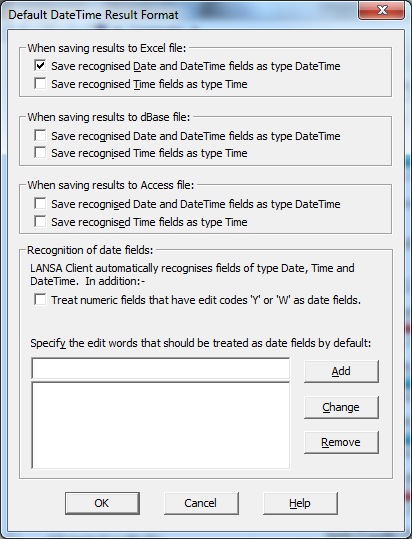
Saving results to Excel files
Specify the field type in which the datetime and time data is to be saved in Excel files.
The default is to save datetime data as a Date field, and save time data as text/numeric.
...
Specify the field type in which datetime and time data is to be saved in dBase files.
The default is to save both datetime and time data as text/numeric.
...
Specify the field type in which the date, datetime and time data is to be saved in MS Access files.
The default is to save date, datetime and time fields using their native types.
...