Page History
...
If you have specified that the query's output is to a Window or File, the Output Options dialog box will be displayed.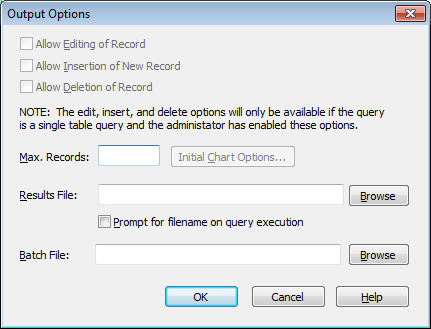
Editing Options
These options give you the ability to change the data retrieved by your query for this particular LANSA Client session only. Editing is only possible if output is to a Window, otherwise the three options will be greyed out.
...
Refer to Edit/Insert/Delete Capabilities for full details.
Allow Editing of Record
Select this option if the results of a query can be changed.
Allow Insertion of New Record
Select this option if new records can be inserted into the file.
Allow Deletion of Record
Select this option if records can be deleted from the file.
Maximum Records per Query
This option allows you to specify the maximum number of records that the query is to retrieve. It is useful to set this to a fairly low number when you are experimenting with search criteria.
...
Your LANSA Client environment may also contain a maximum records setting. If so, the smaller of the two numbers is used.
Initial Chart Options
By using this option, you can reduce the amount of customizing required for a new Chart window.
...
If this option is checked (selected) then you will be prompted for an output filename when the query is executed, with the Results File name provided as a default. If this option is unchecked, the query will output to the Results File without prompting, overwriting the file if it already exists.
Results File
Optionally specify a file to which query results are written. If the Prompt for filename on query execution checkbox is ticked, the user will be given an opportunity to choose a different file, otherwise this file will be overwritten every time the query is run.
If a filename is not specified here, the user will be prompted for an output filename each time the query is executed.
Batch File
Optionally specify the filename of a batch script to be executed after a query has executed. No arguments are passed to the script, and Client will not halt while the script is running.