Page History
...
- Copy and paste the DHTML-JavaScript code in AJAX Page AJAXEX2.HTM using NOTEPAD and save it into your Framework private working folder as an AJAX page file named AJAXEX2.HTM.
- Copy and paste the AJAX function code in AJAX Function AJAXEX2 into an RDML function named AJAXEX2 into your VL-IDE. Compile RDML function AJAXEX2 so that it is executable on your web server.
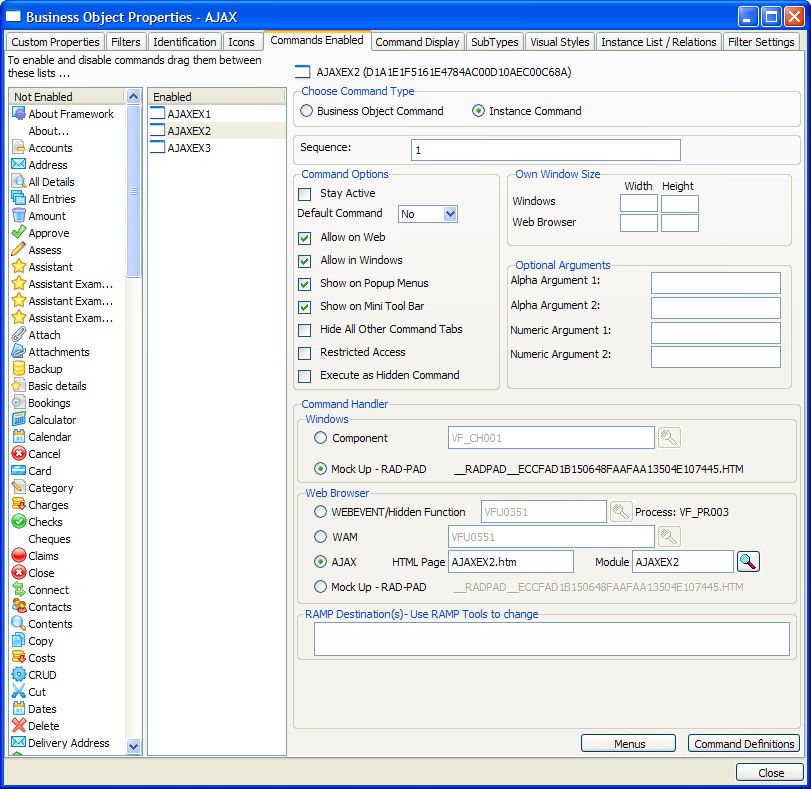
- In business object AJAX, snap AJAX page file AJAXEX2.HTM and AJAX function AJAXEX2 into your Framework as the command handler to be associated with command AJAXEX2 like this:
- Save, restart and execute your Framework in a web browser. Select application ‘AJAX Examples’ and then select business object AJAX. This should execute the default command AJAXEX1. Click on the AJAXEX2 tab to execute the AJAXEX2 command:
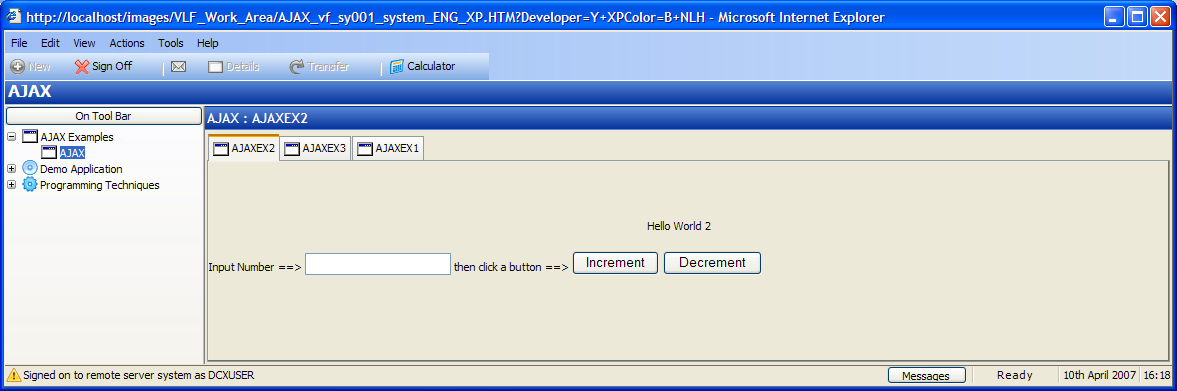
Enter a number and then click the increment and decrement buttons. The value you enter is sent to the AJAX function on the web server and incremented or decremented as requested. The result is then redisplayed in the AJAX page.
...