Page History
...
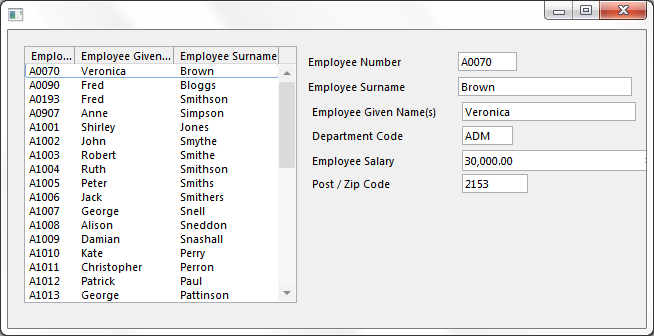
この例では、部門コード、社員の賃金、郵便番号の情報がArray コレクションに保存されます。リスト・ビューで社員が選択されると、この情報がArray コレクションから取得されます。

コレクションの定義
部門、賃金、郵便番号のコレクションを保存するツリーのArray コレクションは、このように定義されます。
Define_
...
Com Class(#Prim_ACol<#Deptment>)
...
 Name(#Department_Array)
     Define_
...
Com Class(#Prim_ACol<#Salary>)
...
 Name(#Salary_Array)
     Define_
...
Com Class(#Prim_ACol<#PostCode>)
...
Name(#PostCode_Array)
コレクションでは、収集されるオブジェクトのタイプとコレクションの名前を定義します。
...
アイテムをコレクションに追加するには、最初に挿入するオブジェクトのインスタンスを作成する必要があります。
Define_
...
Com Class(#Deptment)
...
 Name(#Department_Item)
     Define_
...
Com Class(#Salary)
...
 Name(#Salary_Item)
     Define_
...
Com Class(#PostCode)
...
Name(#PostCode_Item)
...
オブジェクトが作成されると、その値が設定され、Insertメソッドを使用してコレクションに追加されます。
...
Set Com(#Department_Item)
...
Value(#Deptment)
...
Invoke Method(#Department_Array.Insert)
...
Item(#Department_Item)
...
Set Com(#Salary_Item)
...
Value(#Salary)
...
Invoke Method(#Salary_Array.Insert)
...
Item(#Salary_Item)
...
Set Com(#PostCode_Item)
...
Value(#PostCode)
...
Invoke Method(#PostCode_Array.Insert)
...
Item(#PostCode_Item)
コレクションからの値の取得
コレクションに保存されている社員の値は、社員がリストで選択されたときに取得されます。Array コレクションは、リスト・ビューのエントリーと同じ順序なので、リスト・ビューのエントリー番号を索引に使用してArray コレクションから値を取得できます。
...
Change Field(#USE_INDEX)
...
To('#EMP_LIST.CURRENTITEM.ENTRY')
Array コレクションの値は、Department、Salary、およびPostCodeフィールドに割り当てられます。
...
Set Com(#Deptment)
...
Value(#Department_Array.Item<#Use_Index>.Value)
...
Set Com(#Salary)
...
Value(#Salary_Array.Item<#Use_Index>.Value)
...
Set Com(#PostCode)
...
Value(#PostCode_Array.Item<#Use_Index>.Value)
サンプルのソース
     Begin_Com Role(*EXTENDS #PRIM_FORM) Clientheight(298) Clientwidth(638) Height(325) Left(269) Top(107) Visualstyle(#VS_NORM) Width(646)
     *
...
-------------------------------------------------------------------------
...
* This example demonstrates the use of array collections (#PRIM_ACOL).
...
     * Generally array collections are used where information is stored
     * in a contiguous sequential order and only ever accessed by an index.
     * In such situations they are substantially faster then keyed collections.
     * -------------------------------------------------------------------------
...
     * The list view on the left containing the employee number (#EMPNO),
     * the given name (#GIVENAME) and the surname (#SURNAME).
     Define_
...
Com Class(#PRIM_LTVW)
...
Name(#emp_list)
...
Componentversion(1)
...
Displayposition(1)
...
Fullrowselect(True)
...
Height(257)
...
Left(16)
...
Parent(#COM_OWNER)
...
Selectionstyle(Single)
...
Showsortarrow(True)
...
Tabposition(1)
...
Top(16)
...
 Width(273)
     Define_
...
Com Class(#PRIM_LVCL)
...
Name(#LVCL_1)
...
Displayposition(1)
...
Parent(#emp_list)
...
Source(#EMPNO)
...
 Width(20)
     Define_
...
Com Class(#PRIM_LVCL)
...
Name(#LVCL_2)
...
Displayposition(2)
...
Parent(#emp_list)
...
Source(#GIVENAME)
...
 Width(39)
     Define_Com Class(#PRIM_LVCL) Name(#LVCL_3) Displayposition(3) Parent(#emp_list) Source(#SURNAME) Width(36) Widthtype(Remainder)
     * The fields on right hand side of the panel
     Define_
...
Com Class(#EMPNO.Visual)
...
Name(#EMPNO)
...
Displayposition(2)
...
Height(19)
...
Left(300)
...
Parent(#COM_OWNER)
...
Tabposition(2)
...
Top(22)
...
 Width(209)
     Define_
...
Com Class(#SURNAME.Visual)
...
Name(#SURNAME)
...
Displayposition(3)
...
Height(19)
...
Left(300)
...
Parent(#COM_OWNER)
...
Tabposition(3)
...
Top(47)
...
 Width(324)
     Define_
...
Com Class(#GIVENAME.Visual)
...
Name(#GIVENAME)
...
Displayposition(4)
...
Height(19)
...
Left(304)
...
Parent(#COM_OWNER)
...
Tabposition(4)
...
Top(72)
...
 Width(324)
     Define_
...
Com Class(#DEPTMENT.Visual)
...
Name(#DEPTMENT)
...
Displayposition(5)
...
Height(19)
...
Left(304)
...
Parent(#COM_OWNER)
...
Tabposition(5)
...
Top(96)
...
 Width(201)
     Define_
...
Com Class(#SALARY.Visual)
...
Name(#SALARY)
...
Displayposition(6)
...
Left(304)
...
Parent(#COM_OWNER)
...
Tabposition(6)
...
 Top(120)
     Define_Com Class(#POSTCODE.Visual) Name(#POSTCODE) Displayposition(7) Height(19) Left(304) Parent(#COM_OWNER) Tabposition(7) Top(144) Width(216)
...
     * Define the array collections used to keep collections of
     * departments, salaries and post/zip codes.
     Define_
...
Com Class(#Prim_ACol<#Deptment>)
...
 Name(#Department_Array)
     Define_
...
Com Class(#Prim_ACol<#Salary>)
...
 Name(#Salary_Array)
     Define_Com Class(#Prim_ACol<#PostCode>) Name(#PostCode_Array)
     *
...
--------------------------------------------------------------------------------
...
     * At initialization fill the list view and array collections with employee details
     * --------------------------------------------------------------------------------
     Evtroutine Handling(#COM_OWNER.Initialize)
...
Select Fields(#EMPNO #GIVENAME #SURNAME #SALARY #POSTCODE #DEPTMENT) From_File(PSLMST)
...
     Invoke Method(#Com_Owner.AddEmployee)
     Endselect
     Endroutine
     *
...
----------------------------------------------------------------------------
...
     * This method routine add details of an employee to the list view and also
     * stores salary, department and post/zip code details in the array collections
     * ----------------------------------------------------------------------------
     Mthroutine Name(AddEmployee)
     * Cause new instances of a department, salary and post/zip code object to be created
     Define_
...
Com Class(#Deptment)
...
 Name(#Department_Item)
     Define_
...
Com Class(#Salary)
...
 Name(#Salary_Item)
     Define_Com Class(#PostCode) Name(#PostCode_Item)
     * Add an entry to the list view
     Add_Entry To_List(#EMP_LIST)
...
     * Set up the Department, Salary and Postcode item objects and
     * then add references to them to the associated array collections.
     * You need to do this because array collections (PRIM_ACOL)
...
 only
     * store references to objects.
     Set Com(#Department_Item)
...
 Value(#Deptment)
     Invoke Method(#Department_Array.Insert) Item(#Department_Item)
...
Set Com(#Salary_Item)
...
 Value(#Salary)
     Invoke Method(#Salary_Array.Insert) Item(#Salary_Item)
...
Set Com(#PostCode_Item)
...
 Value(#PostCode)
     Invoke Method(#PostCode_Array.Insert) Item(#PostCode_Item)
     Endroutine
     *
...
------------------------------------------------------------------
...
     * Handle the selection of an item in the list view by displaying the
     * associated employee details in the fields on the right of the panel
     * ------------------------------------------------------------------
     Evtroutine Handling(#Emp_List.ItemGotSelection)
     Define Field(#USE_INDEX) Reffld(#STD_NUM)
...
     * The values for #EMPNO, #GIVENAME and #SURNAME have been set from
     * the fields in the list view .....
...
 however the #DEPARTMENT, #SALARY
     * and #POSTCODE values need to be retreived from the array collections
     * that stored them. Since the array collections are in the same order
     * as the entries in the list view you can use the list view entry
     * number as the index to get the values from the array collections.
     Change Field(#USE_INDEX) To('#EMP_LIST.CURRENTITEM.ENTRY')
     * Now set the fields on the right from values in the respective arrays
...
Set Com(#Deptment)
...
Value(#Department_Array.Item<#Use_Index>.Value)
...
Set Com(#Salary)
...
 Value(#Salary_Array.Item<#Use_Index>.Value)
     Set Com(#PostCode) Value(#PostCode_Array.Item<#Use_Index>.Value)
     Endroutine
     End_Com