Page History
この例では、リストを定義して単純な値とピックリストの両方でエントリーを追加する方法を示すプロパティ・シートを作成します。

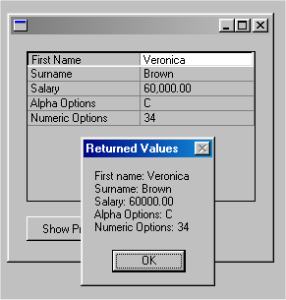
プロパティ・シートの例のコード
このコードをコピーしてフォームに貼り付け、フォームをコンパイルして実行してください。
FUNCTION optionsFUNCTION options(*DIRECT)BEGIN_COM heightCOM height(254) leftleft(375) toptop(161) widthwidth(272)DEFINE_COM class(#PRIM_PROP) name(#PROP_1) busyupdatesofparent(True) columnbuttons(False) displayposition(1) dragstyle(Aggregated) height(153) left(16) parent(#COM_OWNER) rowheight(15) tabposition(1) top(16) visualstyleofparent(False) width(233)DEFINE_COM classCOM class(#PRIM_PHBN) namename(#PHBN_1) captioncaption('Show PropertiesShow Properties') displaypositiondisplayposition(2) leftleft(16) parentparent(#COM_OWNER) tabpositiontabposition(2) toptop(184) widthwidth(105)DEFINE_COM classCOM class(#PRIM_PRCL) namename(#PRCL_1) displaypositiondisplayposition(1) parentparent(#PROP_1) sourcesource(#PROPERTY) widthwidth(50)DEFINE_COM class(#PRIM_PRCL) name(#PRCL_2) displayposition(2) parent(#PROP_1) source(#VALUE) width(20) widthtype(Remainder)* Data class definitions for the property sheet* Define #givename data class based on the repository field #givenameData class definitions for the property sheet* Define #givename data class based on the repository field #givenameDEFINE_COM classCOM class(#GIVENAME) namename(#GIVENAME)* Define #surname data class based on the elemental data class #PRIM_ALPH Define #surname data class based on the elemental data class #PRIM_ALPH (string)DEFINE_COM classCOM class(#SURNAME) namename(#SURNAME)* Define #salary data class based on the repository field #salaryDefine #salary data class based on the repository field #salaryDEFINE_COM classCOM class(#SALARY) namename(#SALARY)* Define #expenses data class based on the elemental data class #PRIM_NMBR Define #expenses data class based on the elemental data class #PRIM_NMBR (number)DEFINE_COM classCOM class(#PRIM_ALPH) namename(#OPTIONSA)* Define #optionsn data class based on the elemental data class #PRIM_NMBR Define #optionsn data class based on the elemental data class #PRIM_NMBR (number)DEFINE_COM class(#PRIM_NMBR) name(#OPTIONSN) length(9)* Pick list and pick list item definitions for the property sheetPick list and pick list item definitions for the property sheet* pick list counter pick list counter (index)DEFINE_COM classCOM class(#STD_COUNT) namename(#CUR_PLIST)* pick list item counter pick list item counter (index)DEFINE_COM class(#STD_COUNT) name(#CUR_PITEM)* collection of pick lists (shown inside the property sheetcollection of pick lists (shown inside the property sheet)DEFINE_COM classCOM class(#PRIM_KCOL) namename(#PL_COL) collectscollects(#PRIM_PKLT) keyedbykeyedby(#STD_COUNT)* collection of pick list itemscollection of pick list itemsDEFINE_COM class(#PRIM_KCOL) name(#PI_COL) collects(#PRIM_PKIT) keyedby(#STD_COUNT)* Add new picklistSUBROUTINE nameAdd new picklistSUBROUTINE name(ADD_PLIST)* give the new pick list an index numberCHANGE fieldgive the new pick list an index numberCHANGE field(#CUR_PLIST) toto('#Cur_PList PList + 11')ENDROUTINE* Add new picklist itemSUBROUTINE nameAdd new picklist itemSUBROUTINE name(ADD_PITEM) parmsparms((#PROPERTY #PROPERTY *RECEIVED) (#VALUE #VALUE *RECEIVED))* give the new pick list item an index numberCHANGE fieldgive the new pick list item an index numberCHANGE field(#CUR_PITEM) toto('#Cur_PItem PItem + 11')* Set the caption and the value of the item plus assign it into the picklistSET comSet the caption and the value of the item plus assign it into the picklistSET com(#PI_Col<#Cur_PItem>) captioncaption(#property) defaultdefault(True) valuevalue(#value) parentparent(#PL_COL<#Cur_PList>)ENDROUTINE* fill the property sheetEVTROUTINE handlingfill the property sheetEVTROUTINE handling(#prop_1.Initialize) optionsoptions(*NOCLEARMESSAGES NOCLEARMESSAGES *NOCLEARERRORS)* set values for the entriesCHANGE fieldset values for the entriesCHANGE field(#GIVENAME) toto('''Veronica''')SET comSET com(#surname) valuevalue('Brown')CHANGE field(#SALARY) to(60000)* Add an alphanumeric entry based on the data class of the field - First NameCHANGE fieldAdd an alphanumeric entry based on the data class of the field - First NameCHANGE field(#PROPERTY) toto('''First NameFirst Name''')CHANGE fieldCHANGE field(#VALUE) toto(#GIVENAME)ADD_ENTRY toENTRY to_list(#PROP_1)SET com(#prop_1.CurrentItem) dataclass(#givename)* Add an alphanumeric entry based on the data class of the field - SurnameCHANGE fieldAdd an alphanumeric entry based on the data class of the field - SurnameCHANGE field(#PROPERTY) toto('''Surname''')CHANGE fieldCHANGE field(#VALUE) toto(#surname)ADD_ENTRY toENTRY to_list(#PROP_1)SET com(#prop_1.CurrentItem) dataclass(#surname)* Add a numeric entry based on the data class of the field - SalaryCHANGE fieldAdd a numeric entry based on the data class of the field - SalaryCHANGE field(#PROPERTY) toto('''Salary''')CHANGE fieldCHANGE field(#VALUE) toto('#SALARY.TEXT')ADD_ENTRY toENTRY to_list(#PROP_1)SET com(#prop_1.CurrentItem) dataclass(#salary)* Create picklist with three items and add it to an alphanumeric entry - Alpha OptionsEXECUTE subroutineCreate picklist with three items and add it to an alphanumeric entry - Alpha OptionsEXECUTE subroutine(ADD_PLIST)EXECUTE subroutineEXECUTE subroutine(ADD_PITEM) withwith_parms('A' 'option Aoption A')EXECUTE subroutineEXECUTE subroutine(ADD_PITEM) withwith_parms('B' 'option Boption B')EXECUTE subroutine(ADD_PITEM) with_parms('C' 'option C')CHANGE fieldCHANGE field(#PROPERTY) toto('''Alpha OptionsAlpha Options''')SET comSET com(#optionsa) picklistpicklist(#PL_COL<#Cur_PList>)CHANGE fieldCHANGE field(#VALUE) toto('#OPTIONSA.TEXT')ADD_ENTRY toENTRY to_list(#PROP_1)SET com(#prop_1.CurrentItem) dataclass(#optionsa)* Create picklist with three items and add it to a numeric entry - Numeric OptionsEXECUTE subroutineCreate picklist with three items and add it to a numeric entry - Numeric OptionsEXECUTE subroutine(ADD_PLIST)EXECUTE subroutineEXECUTE subroutine(ADD_PITEM) withwith_parms('1001' '1001')EXECUTE subroutineEXECUTE subroutine(ADD_PITEM) withwith_parms('220' '220')EXECUTE subroutine(ADD_PITEM) with_parms('34' '34')CHANGE fieldCHANGE field(#PROPERTY) toto('''Numeric OptionsNumeric Options''')SET comSET com(#optionsn) picklistpicklist(#PL_COL<#Cur_PList>)CHANGE fieldCHANGE field(#VALUE) toto('#OPTIONSN.TEXT')ADD_ENTRY toENTRY to_list(#PROP_1)SET com(#prop_1.CurrentItem) dataclass(#optionsn)ENDROUTINEEVTROUTINE handlingEVTROUTINE handling(#PHBN_1.Click)USE builtinUSE builtin(MESSAGE_BOX_ADD) withwith_args('First nameFirst name: ' #GIVENAME#GIVENAME)USE builtinUSE builtin(MESSAGE_BOX_ADD) withwith_args('Surname: ' #SURNAME#SURNAME)USE builtinUSE builtin(MESSAGE_BOX_ADD) withwith_args('Salary: ' #SALARY#SALARY)USE builtinUSE builtin(MESSAGE_BOX_ADD) withwith_args('Alpha OptionsAlpha Options: ' #OPTIONSA#OPTIONSA.TEXT)USE builtin(MESSAGE_BOX_ADD) with_args('Numeric Options: ' #OPTIONSN.TEXT)USE builtin(MESSAGE_BOX_SHOW) with_args(' ' ' ' ' ' 'Returned Values')ENDROUTINEEND_COM
プロパティ・シートに関する注意事項
値の割り当て
#Value列の値を設定する場合に、エントリーのデータ・クラスが#PRIM_ALPH、#PRIM_NMBR、または数値フィールドに基づく場合は、コンポーネントのTextプロパティを使用する必要があります。
CHANGE field(#PROPERTY) to('''Salary''')CHANGE field(#VALUE) to('#SALARY.TEXT')ADD_ENTRY to_list(#PROP_1)SET com(#prop_1.CurrentItem) dataclass(#salary)
...
USE builtin(MESSAGE_BOX_ADD) with_args('First name: ' #GIVENAME)USE builtin(MESSAGE_BOX_ADD) with_args('Last name: ' #SURNAME)USE builtin(MESSAGE_BOX_ADD) with_args('Salary: ' #SALARY)USE builtin(MESSAGE_BOX_ADD) with_args('Alpha Options: ' #OPTIONSA.TEXT)USE builtin(MESSAGE_BOX_ADD) with_args('Numeric Options: ' #OPTIONSN.TEXT)