Page History
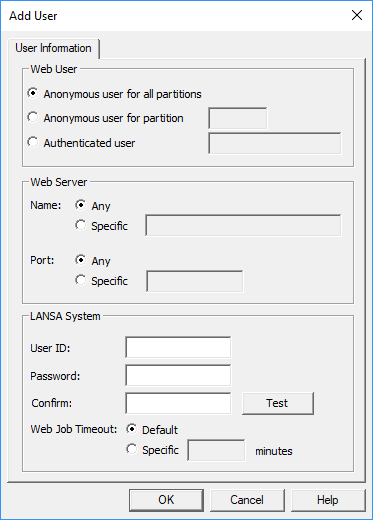
Web User
Mandatory.
This is the user profile registered to the Web Server. Choose Anonymous user for all partitions as a user profile to associate a host user profile for anonymous access to your LANSA applications. This entry will be seen as DFTUSR in the User Registration list
...
Priority | Web User | Web Server Name | Web Server Port |
|---|---|---|---|
1 | Authenticated User | Specified Name | Specified Port |
2 | Authenticated User | Specified Name | Any |
3 | Authenticated User | Any | Specified Port |
4 | Authenticated User | Any | Any |
5 | Anonymous user for partition | Specified Name | Specified Port |
6 | Anonymous user for partition | Specified Name | Any |
7 | Anonymous user for partition | Any | Specified Port |
8 | Anonymous user for partition | Any | Any |
9 | Anonymous user for all partitions | Specified Name | Specified Port |
10 | Anonymous user for all partitions | Specified Name | Any |
11 | Anonymous user for all partitions | Any | Specified Port |
12 | Anonymous user for all partitions | Any | Any |
Web Server - Name
Mandatory. If you are not using multi-homing support, choose Any as your Web Server Name.
If you are using multi-homing support, enter either the DNS Name (for example: syd.lansa.com) or the DNS's IP Address (for example: 124.54.56.21) in the System Name field.
Web Server - Port
Mandatory. If you are not using multi-homing support, choose Any as your Web Server Port.
If you are using multi-homing support, enter the port number associated with the Web Server Name and the Web User.
Timeout
Mandatory. The timeout period for each user. Choosing Default means that the system wide timeout applies.
LANSA System User ID, Password and Confirm
Mandatory. Enter the host profile to which the Web Server user profile is mapped. The password is case sensitive on some systems. You must confirm the password to be able to save.
Test
Establish a communication connection to the Data/Application Server from the system you are currently connected to and with the current user profile.