Page History
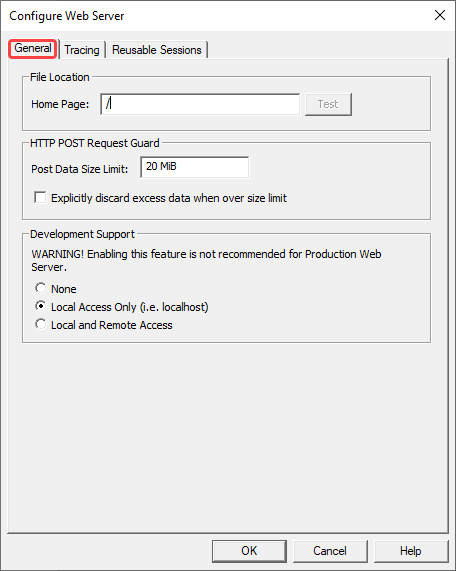
Home Page
Enter the URL to be called when the user selects the 'Home' button in LANSA functions.
By default, this parameter is set to '/' pointing to the default home page of the Web Server.
Post Data Size Limit
Use this option to limit the amount of posted data to be accepted by the Web Server. HTTP POST requests with posted data exceeding the limit will be rejected.
You can enter the limit either as a number of bytes or a number suffixed with one of the following units: KB (1,000 bytes), KiB (2^10 = 1024 bytes), MB (1,000,000 bytes) or MiB (2^20 = 1048576 bytes).
Explicitly discard excess data when over size limit
Enabling this option will send error pages for rejected requests to the browser once all posted data has been received. This will make sure the browser receives the error pages properly but it does impose overheads to deal with the excessive volume of posted data.
...
For normal operations, it is recommended that you do not to enable this option.
Development Support
Selecting this option will enable you to run LANSA Web Server Extension in Development Support mode. This is not recommended for the Production Web Server. If enabled, it exposes internal settings, which can compromise security.
...
By default, this parameter is set to Local Access Only.