Page History
When you select the Add or Change button on the Maintain Systems dialog box, the Add or Change LANSA System (as appropriate) is displayed. Add or change the Data/Application Server options as required.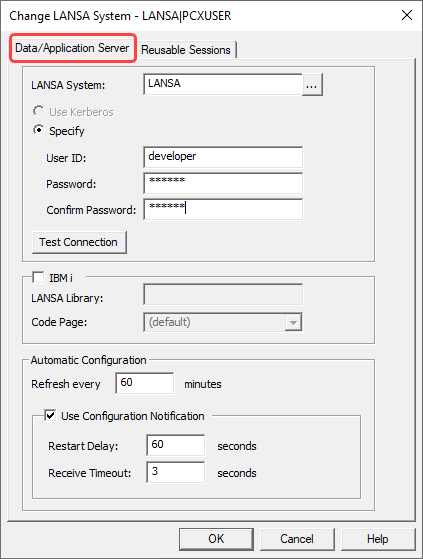
LANSA System
Enter the name of the host that is acting as your Data/Application Server. This name must be known to the LANSA Communications Extensions. You must not leave this parameter blank.
...
For LANSA Web Server Extension configurations:
if left blank, no code page translations will be performed.
otherwise:
the value specified defines the name of the LANSA Code Page mapping table. This Code Page mapping table must be located in the LANSA Web Server Extension code page directory (by default C:\Program Files (x86)\LANSA\WebServer\IISPlugin\codepage).
- For a deployment with a Windows host, leave this field blank.
- For a deployment with an IBM i host, enter the name of the relevant EBCDIC translation table shipped.
If you wish to use your own customized code page files you need to add them to the code page directory. Note that if the specified file cannot be found, a file with the same name but prefixed with wpi_ will be used. This is to ensure backward compatibility. For example, if you enter cp037, the LANSA Web Server Extension will look for cp037.dat in the code page directory and if that file is not found it will then look for wpi_cp037.dat in the code page directory.
Automatic Configuration
Refresh every
Specify how often the LANSA system's configuration will be refreshed by the LANSA Web Server Extension. To disable, set the value to 0. In that case the configuration will only be loaded when the web server starts.
...