Page History
1. Select the Source tab to return to your WAM's RDMLX code and add a new WebRoutine named Details.
This WebRoutine needs to:
- Receive a value for the EMPNO field from the browser.
- Retrieve the employee record using a FETCH command from the file PSLMST.
- Display values for EMPNO, GIVENAME, SURNAME, ADDRESS1, ADDRESS2, ADDRESS3, POSTCODE, PHONEHME, PHONEBUS, DEPTMENT, SECTION, SALARY, STARTDTE and TERMDATE. All these fields should be mapped for output, at this stage you are writing an enquiry WebRoutine.
| Tip |
|---|
| Hint #1: Remember it's a good programming technique to use a GROUP_BY to define a set of fields. You can also use a GROUP_BY to map fields into or out of the WebRoutine. Remember to set all fields in the group as *OUTPUT to ensure they are displayed and cannot be changed (you can also use *OUT to save on typing). |
| Tip |
|---|
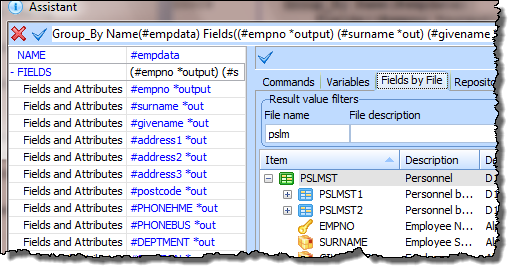
| Hint #2: Always create a GROUP_BY command with the F4 Command Assistant. This dialog |
...
| allows you to quickly select fields from a file definition. You can then also define the *out attribute against each field, while using this dialog. |
...
| To do this, click in one of the Fields and Attributes values, use the cursor key to move right, then type space, followed by *out. |
| Tip |
|---|
| Hint #3: Think about what fields are "input" to the WebRoutine and which fields are "output" from the WebRoutine (to be displayed on the web form). This affects the For() parameter required on the web_map. |
| Tip |
|---|
| Hint #4: As with all database programming, consider how to handle an error condition. For example you could use an IF_STATUS to display an error message if the Employee record is not found. The LANSA I/O status is returned as field IO$STS and the IF_STATUS command compares with this field. |
| Tip |
|---|
| Hint: #5: In a WAM, a validation error on an I/O command will branch to the EndRoutine, unless you have written VAL_ERROR(*next). |
Your WAM code should now look like the following:
     Function Options(*DIRECT)
     Begin_Com Role(*EXTENDS #PRIM_WAM) Layoutweblet('iiilay01')
     Group_By Name(#empdata) Fields((#empno *output) (#surname *out) (#givename *out) (#address1 *out) (#address2 *out) (#address3 *out) (#postcode *out) (#PHONEHME *out) (#PHONEBUS *out) (#DEPTMENT *out) (#SECTION *out) (#SALARY *out) (#STARTDTE *out) (#TERMDATE *out))
     WebRoutine Name(begin)
     Web_Map For(*output) Fields(#empno)
     Endroutine
     Webroutine Name(details) Desc('Employee Details')
     Web_Map For(*output) Fields(#empdata)
     Fetch Fields(#empdata) From_File(pslmst) With_Key(#empno) Val_Error(*next)
     If_Status Is_Not(*OKAY)
     Message Msgtxt('Employee not found')
     Endif
     Endroutine
     End_Com
2. Compile your WAM. The changes you made to the "Begin" WebRoutine web page will be retained. XSL and XML will be built for your new WebRoutine only, as part of the compile.
3. To open the Design view for the Details WebRoutine, use the  icon in the source code. Your web page should look like the following: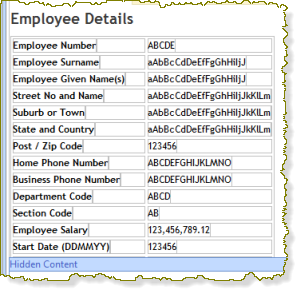
4. The fields DEPTMENT and SECTION may have a dropdown weblet visualization defined in the Repository. In this case their value will not be shown when they are output fields. You will be using field visualizations in a later exercise. If their value is not currently shown, select each in turn and use the context menu option Change to Output Field. This will display these fields as normal output fields.
...