Page History
1. Create a new WAM with:ç
...
Name: iiiEmpEnqMap
Description: Employee Enquiry with Map
Layout Template: iiilay01
Create the WAM by copying the following code into the default WAM source:
     Group_By Name(#empgroup) Fields((#SURNAME *OUT) (#GIVENAME *OUT) (#ADDRESS1 *OUT) (#ADDRESS2 *OUT) (#ADDRESS3 *OUT) (#POSTCODE *OUT) (#PHONEHME *OUT) (#PHONEBUS *OUT) (#DEPTMENT *OUT) (#SECTION *OUT) (#SALARY *OUT) (#STARTDTE *OUT) (#TERMDATE *OUT))
     Define #ADDRESS Type(*string) Length(1000)
     Webroutine Name(begin) Desc('Select Employee')
     Web_Map For(*output) Fields(#empno)
     Endroutine
     Webroutine Name(DETAILS) Desc('Employee Details')
     Web_Map For(*BOTH) Fields((#EMPNO *OUTPUT)(#ADDRESS *hidden))
     Web_Map For(*OUTPUT) Fields(#empgroup)
     Fetch Fields(#empgroup) From_File(PSLMST) With_Key(#EMPNO) Val_Error(*NEXT)
     If_Status Is_Not(*OKAY)
     Message Msgtxt('Employee not found')
     Transfer Toroutine(begin)
     Endif
     Endroutine
2. Compile the WAM.
3. Add a push button to the begin web page.
a. Open the begin WebRoutine in the Design view.
...
e. Remove the * placeholder characters.
f. Save your changes.
4. Open the Details WebRoutine in the Design view.
a. Add a column to the fields table
...
c. Click inside the new column and use the context menu to Insert HTML / Div. Your design should look like the following: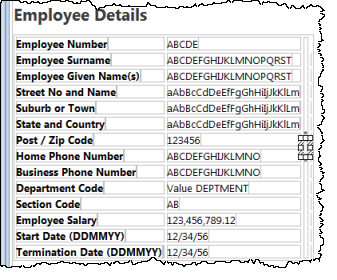
d. With the DIV still selected, select the Details tab. Expand its Style property and set the following properties:
Property | Value |
|---|---|
Height | 340px |
Margin-left | 50px |
Width | 340px |
Your design should look like the following: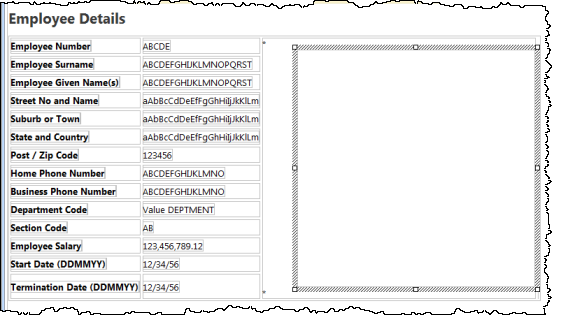
e. Delete the * place holder characters from this column.
...