Page History
...
In the business object Reports create an invisible filter that fills the instance list with the five report names. Make sure to include AKeyN and/or NKeyN values that identify the associated report. For example:
BEGIN_COM ROLE(*EXTENDS #VF_AC007) HEIGHT(182) WIDTH(326)
Mthroutine uInitialize Options(*Redefine)
#Com_Owner.avHiddenFilter := TRUE
#avListManager.ClearList
Invoke #avListManager.AddtoList Visualid1('Report 1') Visualid2('Daily production report') AKey1('uReport1') NKey1(1)
Invoke #avListManager.AddtoList Visualid1('Report 2') Visualid2('Monthly production report') AKey1('uReport2')
...
NKey1(2)
Invoke #avListManager.AddtoList Visualid1('Report 3') Visualid2('Overloaded production report') AKey1('uReport3') NKey1(3)
Invoke #avListManager.AddtoList Visualid1('Report 4') Visualid2('Monday Morning Management Report') AKey1('uReport4') NKey1(4)
Invoke #avListManager.AddtoList Visualid1('Report 5') Visualid2('Daily production report') AKey1('uReport5') NKey1(5)
* Instance list updating has been completed
INVOKE METHOD(#avListManager.EndListUpdate)
Endroutine
End_Com
The instance list and command handler tabs are presented to the user like this: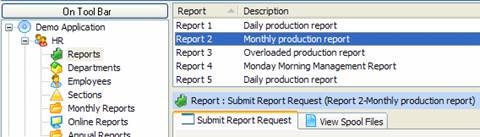
When the user clicks on a report in the instance list the associated 5250 destination screen is displayed on the tab
...
Say the numeric instance list key value NKey1 contained the requested report number ….. then you could change the script that navigates to uReport1 to be like this:
/* See is the report number in the instance list is for some other report */
/* If it is then "reroute" this request to correct 5250 destination form */
switch ( objListManager.NKey1[0] )
{
 case 2: NAVIGATE_TO_SCREEN("uReport2"); return;
case 3: NAVIGATE_TO_SCREEN("uReport3"); return;
case 4: NAVIGATE_TO_SCREEN("uReport4"); return;
case 5: NAVIGATE_TO_SCREEN("uReport5"); return;
}
/* Normal navigation logic to handle report number 1 */
NAVIGATE_TO_JUNCTION("whatever");
Etc, etc ……………………
If the alphanumeric instance list key value AKey1 contained the requested 5250 destination screen's name ….. then you could change the script like this:
/* See is the 5250 screen name is this screen's name
...
*/
/* If it is then "reroute" this request to correct 5250 destination form */
if (objListManager.AKey1[0] != "uReport1")
{
   NAVIGATE_TO_SCREEN(objListManager.AKey1[0]);
   return;
}
/* Normal navigation logic to handle this screen */
NAVIGATE_TO_JUNCTION("whatever");
Etc, etc ……………………