Page History
...
A single query can include search conditions which require a prompted value as well as conditions which don't require a prompt.
Prompt for value when query is executed
Select this option to prompt for a value when the query is executed.
Prompt Text
In up to 40 characters, enter the text to be displayed in the Condition Prompt dialog box. For example, "Enter the month to be reported".
If no text is specified, LANSA Client will use the descriptive name of the field to build prompt text, such as: "Please enter a value for <field descriptive name>".
How It Works
A Condition Prompt dialog box is displayed whenever a query with this prompt is executed. As this box is dynamically created for each query, the contents will vary depending on the query's conditions. Each Value entered in this dialog box replaces the Value entered in the Operation area.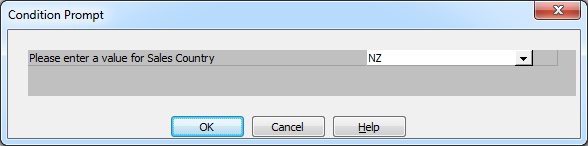
The Value entered in the Operation area is displayed initially. An All Values entry to retrieve all the data can also be selected from the drop down list.
...