Page History
...
- Step 1. Create a Technology Service
- Step 2. Create the Technology Service XSL Stylesheets
- Step 2a. Create the WebRoutine TSP Stylesheet
- Step 2b. Create the Weblet TSP Stylesheet
- Step 2c. Copy your Technology Service Stylesheets to the TSP directory
| Anchor | ||||
|---|---|---|---|---|
|
You create a Technology Service using the LANSA Editor. The Provider and Technology Service name uniquely identify the Technology Service.
When you create a Technology Service you define its properties. The properties store definitions and options used by the LANSA Editor and the WAM runtime.
See Also
...
Technology Services in the Visual LANSA User Guide.
Technology Services in the Technical Reference Guide.
| Anchor | ||||
|---|---|---|---|---|
|
How WAMs use XSL stylesheets to transform the WebRoutine XML document into different presentation formats and the purpose of Technology Services, is described earlier in this guide. Refer to WAMs Deconstructed.
LANSA uses XSL stylesheets itself to generate the WebRoutine XML document and the WebRoutine XSL stylesheet for a Technology Service as shown here: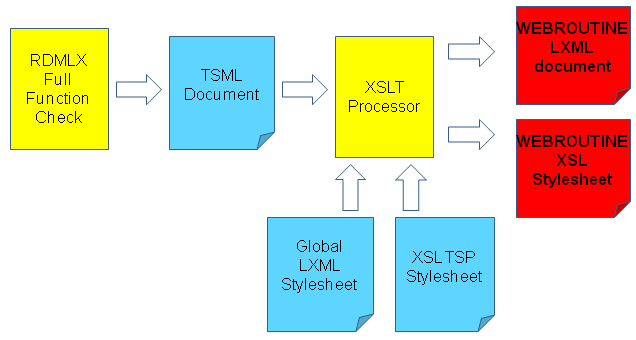
When XSL is generated for a WebRoutine, LANSA generates an in-memory XML document named the Technology Service Markup Language (TSML) document. This is the input document used to create both the WebRoutine LXML document and the
...
When you create a Technology Service you need to provide two TSP stylesheets:
- the The first one to generate the WebRoutine XSL stylesheet.
- the The second one to generate the WAM layout weblet.
...
| Anchor | ||||
|---|---|---|---|---|
|
The WebRoutine TSP stylesheet is used to create the WebRoutine XSL stylesheet as shown in the diagram in Step 2.
You must follow this naming convention (Name must be all lower-case):
tsp_<provider>_<technology_service_name>_WebRoutine.xsl
Where <provider> is the Technology Service Provider and <technology_service_name> is the Technology Service name. For example, for LANSA:XHTML the WebRoutine TSP stylesheet name is:
tsp_lansa_xhtml_WebRoutine.xsl
The easiest way of creating a WebRoutine TSP stylesheet is to base it on the ones provided by LANSA.
| Info |
|---|
| The shipped WebRoutine TSP stylesheets have two top-level parameters (g_inliner_call and g_import_path). These are used to support inline lists. An inliner call is when the generator needs to insert the inline weblet. |
| Anchor | ||||
|---|---|---|---|---|
|
The Weblet TSP stylesheet is used to create the WAM Layout Weblet. When you create a WAM, LANSA checks if it has a Layout weblet. If it doesn't have one, it uses this TSP stylesheet to create one.
You must follow this naming convention (Name must be all lower-case):tsp_<provider>_<technology_service_name>_webletbuilder.xsl
Where <provider> is the Technology Service Provider and <technology_service_name> is the Technology Service name. For example, for LANSA:XHTML the Weblet TSP stylesheet name is:
tsp_lansa_xhtml_webletbuilder.xsl
The easiest way of creating a Weblet TSP stylesheet is to base it on the ones provided by LANSA.
| Note |
|---|
| Note: The shipped Weblet TSP stylesheets have templates for creating other weblets. Currently the only weblet you need to implement in your TSP stylesheet is the Layout weblet. |
| Anchor | ||||
|---|---|---|---|---|
|
All TSP stylesheets must be placed in the TSP directory:
...
IBM i and Linux: ... <lansa root>/x_lansa/web/tsp