Page History
...
Your design should look like the following: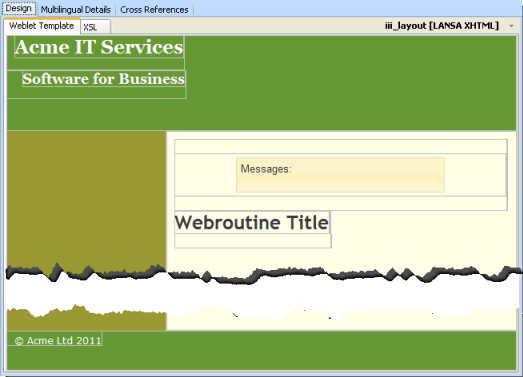
11. On the Favorites/Weblet Templates tab, select jQuery UI group from the top combo box.
The acme_header DIV is the top green box containing the text "Acme IT Services"
a. Select the acme_header DIV
...
g. From the Design ribbon use the Refresh / Web Browser option to refresh the image in the Design view. The menu bar position in the header area should now reflect the CSS changes you added for lpage_navBar.
12. With the menubar selected, set up the menuitems property on the Details sheet, using the Ellipsis button button to open the Design of… dialog. Define a top level menu only as:
Menu Item | Action URL |
|---|---|
Home | |
Support | |
Contact Us | |
About |
13. Save your changes. Your design should look like the following: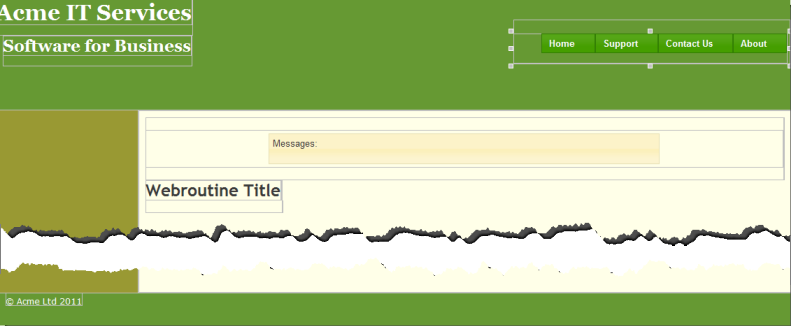
14. Your layout xsl:template currently contains some parameters which will not be used. Delete the following code:
     <xsl:param name="width_type" select="'fluid'"
     wd:type="std:layout_width_type" />
     <xsl:param name="width" select="'1000px'" wd:type="std:css_length_unit" />
     <xsl:param name="sidebar1_width" select="'20%'" wd:tip_id=""
     wd:type="std:css_length_unit" />
     <xsl:param name="content_width" select="'50%'" wd:tip_id=""
     wd:type="std:css_length_unit" />
     <xsl:param name="sidebar2_width" select="'30%'" wd:tip_id=""
     wd:type="std:css_length_unit" />