IDERA SQL Compliance Manager build includes many fixed issues, including the following updates.
| Expand |
|---|
|
Event AlertsEnhanced SQL Object Handling with Schema Name Support SQL Compliance Manager 8.3 enhances the capabilities of Event Alerts, introducing Schema Name Support across the Event Alert Wizard, String Search Dialog, and RuleProcessor, with improved SQL Object Handling and expanded Event Alert coverage. Image Added Image Added
|
| Expand |
|---|
|
Improved Resource Usage SQL Compliance Manager 8.3 includes various bug fixes focused on performance and stability issues, resolves event processing inconsistencies, and improves UI terminology for greater clarity and consistency. - Resolved an issue where Capturing Login Events could cause excessive CPU usage.
- SQL Compliance Manager 8.3 fixed an issue where the Collection Server trace directory could not process backlog files.
- Fixed a case where, after upgrading SQL Compliance Manager version would populate the ObjectType column in the event repository with a value of 0 for certain event classes.
- Updated UI terminology by changing “Collection Servers” to “Collection Services” for improved clarity and consistency.
Before
 Image Added Image Added | After
 Image Added Image Added |
|---|
|
| Expand |
|---|
|
There are no new features with this release. |
| Expand |
|---|
|
Query & Permission Handling Improvements- Resolved an issue where the SELECT query execution took longer when DML auditing was enabled on the server.
- SQL Compliance Manager 8.2 fixed an issue where the SELECT Statements captured variables instead of the actual value.
- Fixed a case where the Login Parameter in the Reports section did not display the full list of logins, preventing reports from being run with all available options.
- SQL Compliance Manager 8.2 fixed an issue where newly added console users were automatically granted the 'sqlcmuser' role (full permissions), even when only read-only access was intended. Users now receive only the roles explicitly assigned to them.
- Fixed a case where Audit Events were not visible in the SQL Compliance console for users who were part of a Windows group, even when they had the necessary permissions.
Error Handling and UI Enhancements- Fixed a case that allowed users to attempt creating additional Collection Services on a machine that only had the management console installed. The message has been updated to clearly state that multiple collection servers require the SQL CM services to be installed on the machine.
- Addressed an issue where a misleading error message was displayed during a console-only installation process.
- Improved and clarified the wording on the SQL Compliance pane used to enter credentials when adding an Azure Blob Storage.
- SQL Compliance Manager 8.2 resolved an issue where the console attempted to start the Collection Service on the repository machine when the repository was on a separate machine from the services.
- Fixed a case where a misleading error was shown when attempting to register a reachable instance while the Collection Service was not running.
- Fixed a bug where SQL Server 2022 (Major Engine version 16.00) was not displayed in SQL Compliance Manager. SQL Compliance Manager 8.2 now supports and collects audit events from RDS servers running SQL Server 2022 (Major Engine version 16.00).
|
| Expand |
|---|
|
There are no new features with this release. |
| Expand |
|---|
|
Error Handling and System Stability SQL Compliance Manager 8.1 includes various bug fixes with a focus on improving error handling and overall system stability. - Resolved an issue where Audit Log Files were generated but not automatically removed, when auditing on premise, Azure MI, or RDS instances.
- SQL Compliance Manager 8.1 addressed an issue where the Agent Service failed to ship trace files when blocking events were encountered.
- Fixed a case where the Audit Log Files would accumulate and increase in number on the audited server.
- SQL Compliance Manager 8.1 fixed an issue where selecting Default Audit Settings while adding a new instance caused the saved Default Settings for Capture DML and Select Activities to be overwritten with Via SQL Server Audit Specifications option.
|
| Expand |
|---|
|
- SQL Compliance Manager 8.0 supports the setup of multiple collection services, as shown below, to provide scale in trace file processing throughput.
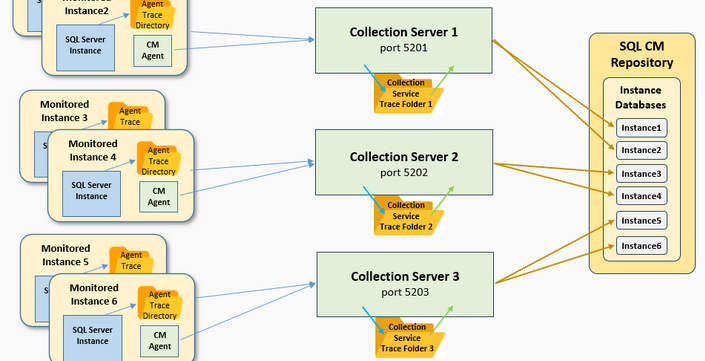
The method to modify the number of collection services is explained in the Multiple Collection Server service support page.
- SQL Compliance Manager 8.0 allows the deployment of the Collection Service and Repository database on separate virtual machines. For this configuration to operate correctly, the trace directory used by the collection service must be shared and accessible by both Virtual Machines.
Visit the Installation of Collection Service and Repository Database on Different Machines page to learn how to install the Repository Database on separate machines.
|
...
| Expand |
|---|
|
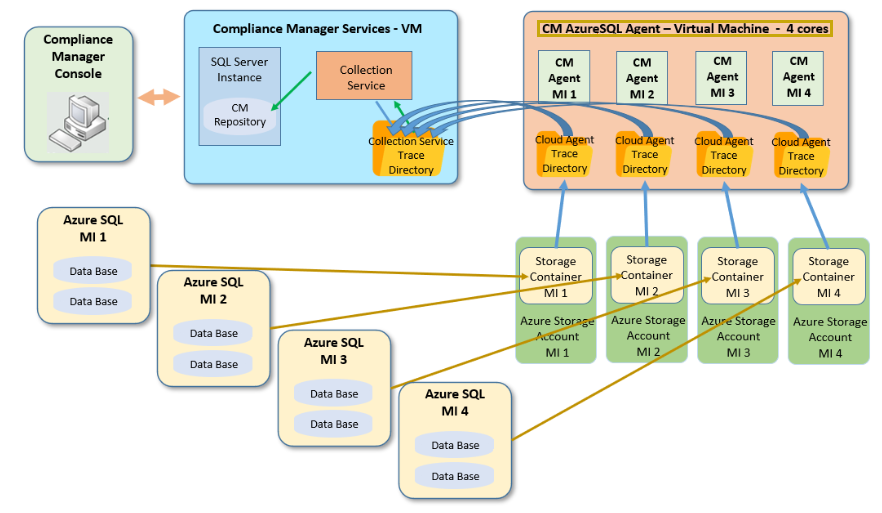
- SQL Compliance Manager 7.0 extends the capabilities of the current SQL CM to support auditing on Azure SQL-managed instances. This feature allows users to provide new audit capacities for Azure MI (managed instances) where the log files are gathered in the collection service trace directory and data is saved in the CM repository that can be accessed through the CM console.
|
| Expand |
|---|
|
There are no fixed issues with this release. |
...