Page History
SQL Safe Backup provides the following new features and fixed issues.
9.
...
5 New Features
Installation
- Older agents need to be upgraded to SQL Safe Backup 9.3 version.
Instances
- When registering an instance, set the "Untrusted Domain" option to identify whether a server is trusted or not.
Upgrades
- New communication protocols.
- Backup agent upgrades:
Warning Before upgrading your Backup Agents, ensure the service account is set correctly. By default, it runs under the LocalSystem user, which may lack the necessary permissions for backup operations. Confirm the appropriate account is configured to prevent issues during the upgrade.
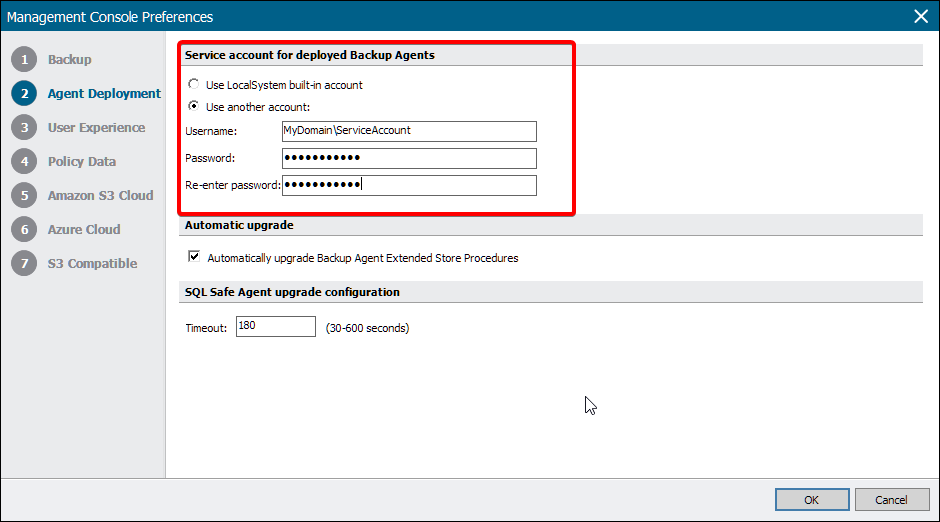
...
Policy
- SQL Safe automatically creates file locations for SQL Server format backups if they do not already exist.
Restore
- Include SQL Server logins when performing any restore operation.
- Restore policies now support Full, Differential, and Transaction Log backups.
9.5 Fixed Issues
Backup
Status colour Green title SQLSAFE- 15242 Notification emails are generated properly for backup operations.
Cluster Environment
...
Users can now change Azure backups from .BAK format to .Server format using SAS authentication tokens and account configurations.15431
Policy
Instances
...
Policies
Status colour Green title SQLSAFE- 15213 Run jobs through Extended Stored Procedures.
Restore
Removing an instance no longer leaves an orphaned reference within an existing policy.15440 Status colour Green title SQLSAFE- 15198
When15483 restoring from Azure Blob, SQL Safe displays all files.- using the native backup format, policies now correctly create folders when SQL Safe variables (e.g., %Instance%%database%) are included in the file path.
RestoreVirtual Database
Status colour Green title SQLSAFE- 15220
The Operation History tab now correctly shows the backup type for CLI and XSP restore operations15308 Mount Virtual Databases properly using the CLI commands- .