Page History
Field Name
EMPNO
Description
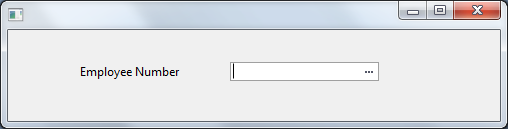
How to visualize a field as an Edit Box on a form and have a prompter for the edit box.
...
- Prompter Form must have a default property.
- Prompter Form must contain some mechanism for returning a Modalresult(ok) when closed successfully (usually done through an OK button).
How to create the sample
- Create a form called EMPNOPRMT. Paste the prompter code from below.
- Open EMPNO field in the component editor and paste Field source from below.
- Create a form and copy the form code from below. Compile and run.
How it works
When creating a prompter form we ensure we follow the prompter form guidelines. We add a property to the form as follows and ensure it is made the default property for the form (eg Defaultpty(p_Employee_number) )
Define_Pty Name(p_Employee_number) Get(*auto #empno) Set(set_empno)
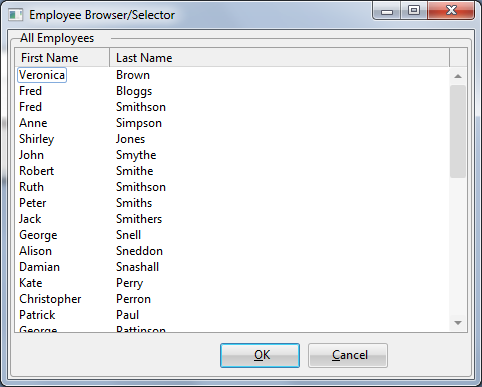
The set of this property will be called when the user activates the prompter (via either F4 or the ellipses button). When called the property will be given the current value of the field. This is to allow the prompter form an opportunity to ensure that the correct employee is selected prior to the display of the form.
...
The field then calls the get of the default property to retrieve the prompter value and updates its contents from the new value.
Prompter Source
     Function Options(*DIRECT)
     Begin_Com Role(*EXTENDS #PRIM_FORM) Defaultpty(p_Employee_number) Clientheight(463) Clientwidth(656) Formstyle(Owned) Height(490) Layoutmanager(#LAYOUT2) Left(330) Popupmenu(#PMNU_1) Top(127) Width(664)
     Define_Com Class(#PRIM_GPBX) Name(#GPBX_2) Caption('All Employees ') Displayposition(1) Height(463) Layoutmanager(#LAYOUT1) Left(0) Parent(#COM_OWNER) Popupmenu(#PMNU_1) Tabposition(1) Tabstop(False) Top(0) Width(656)
     Define_Com Class(#PRIM_LTVW) Name(#LISTVIEW) Displayposition(1) Height(402) Left(6) Parent(#GPBX_2) Popupmenu(#PMNU_1) Tabposition(1) Top(15) Width(644)
     Define_Com Class(#PRIM_LVCL) Name(#LVCL_1) Caption('First Name') Captiontype(Caption) Displayposition(1) Parent(#LISTVIEW) Sortonclick(True) Source(#GIVENAME) Width(35)
     Define_Com Class(#PRIM_LVCL) Name(#LVCL_2) Caption('Last Name ') Captiontype(Caption) Displayposition(2) Parent(#LISTVIEW) Sortonclick(True) Source(#SURNAME) Width(50) Widthtype(Remainder)
     Define_Com Class(#PRIM_LVCL) Name(#LVCL_3) Parent(#LISTVIEW) Source(#EMPNO) Visible(False) Width(20)
     Define_Com Class(#PRIM_ATLM) Name(#LAYOUT1)
     Define_Com Class(#PRIM_ATLI) Name(#IL301) Attachment(Center) Manage(#LISTVIEW) Marginbottom(2) Marginleft(2) Marginright(2) Margintop(2) Parent(#LAYOUT1)
     Define_Com Class(#PRIM_SPLM) Name(#LAYOUT2) Orientation(Vertical)
     Define_Com Class(#PRIM_SPLI) Name(#IS102) Manage(#GPBX_2) Parent(#LAYOUT2) Weight(1)
     Define_Com Class(#PRIM_PMNU) Name(#PMNU_1)
     Define_Com Class(#PRIM_MITM) Name(#HSPLIT) Caption('Split Form Horizontally') Displayposition(1) Parent(#PMNU_1)
     Define_Com Class(#PRIM_MITM) Name(#VSPLIT) Caption('Split Form Vertically') Displayposition(2) Enabled(False) Parent(#PMNU_1)
     Define_Com Class(#PRIM_PANL) Name(#PANL_1) Displayposition(2) Height(40) Left(4) Parent(#GPBX_2) Tabposition(2) Tabstop(False) Top(419) Width(648)
     Define_Com Class(#PRIM_ATLI) Name(#ATLI_1) Attachment(Bottom) Manage(#PANL_1) Parent(#LAYOUT1)
     Define_Com Class(#PRIM_PHBN) Name(#PB_OK) Buttondefault(True) Caption('&OK') Displayposition(1) Left(208) Parent(#PANL_1) Tabposition(1) Top(8)
     Define_Com Class(#PRIM_PHBN) Name(#PHBN_2) Buttoncancel(True) Caption('&Cancel') Displayposition(2) Left(296) Parent(#PANL_1) Tabposition(2) Top(8)
     Group_By Name(#TREEITEMS) Fields(#DEPTMENT #DEPTDESC #SECTION #SECDESC #EMPNO #FULLNAME)
     Define_Pty Name(p_Employee_number) Get(*auto #empno) Set(set_empno)
     Ptyroutine Name(set_empno)
     Define_Map For(*input) Class(#empno) Name(#employee)
     Selectlist Named(#LISTVIEW)
     Continue If('#Employee *ne #empno')
     Set Com(#listview.currentitem) Focus(true) Selected(true)
     Endselect
     Endroutine
     Evtroutine Handling(#com_owner.CreateInstance)
     Set Com(#com_owner) Caption('Employee Browser/Selector')
     * Change Field(#TREEITEMS) To(*NULL)
     * Select Fields(#DEPTMENT #SECTION #EMPNO #SURNAME #GIVENAME) From_File(PSLMST)
     Select Fields(#LISTVIEW) From_File(PSLMST)
     Fetch Fields(#DEPTDESC) From_File(DEPTAB) With_Key(#DEPTMENT) Keep_Last(50)
     Fetch Fields(#SECDESC) From_File(SECTAB) With_Key(#DEPTMENT #SECTION) Keep_Last(50)
     Use Builtin(BCONCAT) With_Args(#GIVENAME #SURNAME) To_Get(#FULLNAME)
     Add_Entry To_List(#LISTVIEW)
     Set Com(#ListView.currentitem) Image(#vi_employ)
     Endselect
     Endroutine
     Evtroutine Handling(#VSPLIT.Click)
     Set Com(#layout2) Orientation(vertical)
     Set Com(#VSplit) Enabled(False)
     Set Com(#HSplit) Enabled(True)
     Endroutine
     Evtroutine Handling(#HSPLIT.Click)
     Set Com(#layout2) Orientation(horizontal)
     Set Com(#HSplit) Enabled(False)
     Set Com(#VSplit) Enabled(True)
     Endroutine
     Evtroutine Handling(#PB_OK.Click)
     Invoke Method(#COM_OWNER.CLOSEFORM)
     Set Com(#com_owner) Modalresult(ok)
     Endroutine
     End_Com
Field Source
     Begin_Com Role(*EXTENDS #PRIM_OBJT)
     Begin_Com Role(*Visual #PRIM_EVEF) Name(#ENTRYFIELD) Defaultvisual(True) Height(19) Usepicklist(False) Width(209)
     End_Com
     Begin_Com Role(*prompter #EMPNOPRMT) Name(#PROMPTER) Defaultprompter(True)
     End_Com
     End_Com
Form Source
     Function Options(*DIRECT)
     Begin_Com Role(*EXTENDS #PRIM_FORM) Clientheight(108) Clientwidth(492) Height(135) Left(304) Top(155)
     Define_Com Class(#EMPNO.Visual) Name(#EMPNO) Displayposition(1) Left(72) Parent(#COM_OWNER) Showprompter(True) Tabposition(1) Top(32) Usepicklist(False) Width(299)
     End_Com
Appearance
| Note |
|---|
Notes:
|