Page History
...
To create a "Hello world" web application, you could drag and drop a push button onto a Web Page and then add code for the button click event to show an alert. The resulting code might look like the following:
     Begin_Com Role(*EXTENDS #PRIM_WEB)

  Define_Com Class(#PRIM_PHBN) Name(#Button) Displayposition(1) Left(63) Parent(#COM_OWNER) Tabposition(1) Top(27) Caption('Click Here') Height(50) Width(150)
     Evtroutine Handling(#Button.Click)

       #sys_web.alert( "Hello World" )
     Endroutine
     End_Com
If you like, copy and paste this code and create your own Web Page, then from the Home ribbon, save and compile the Web Page.
...
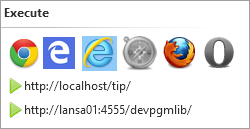
If you want to nominate a different target browser and/or base URL to be used when executing the web page, go back to the Home ribbon and use the dropdown on the Execute icon to select the appropriate options.
| Note |
|---|
| Note: The Base URL options can be set in the LANSA Settings. Refer to Web Server Up and Running for more information. |