Page History
...
Apart from the Data Warehouse or Repository connection to SQL Server, there must be at least one other connection to the Target Data warehouse database, such as Greenplum, Netezza, or PDW.
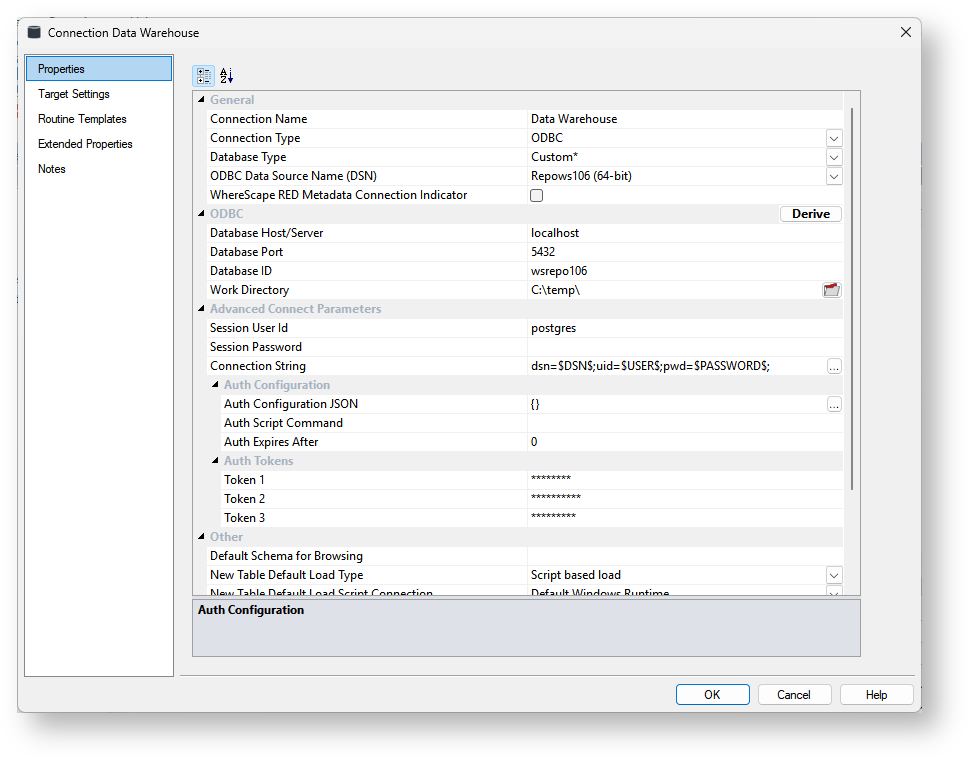

General
Options | Description | ||
|---|---|---|---|
Connection Name | Name used to label the connection within WhereScape RED. For target databases like Snowflake, Redshift, Greenplum, Netezza, or PDW, the Data Warehouse connection can be renamed to Repository. | ||
Connection Type | Indicates the connection source type or the connection method, such as Database, ODBC, Windows, or Unix. Select the Database connection type. | ||
Database Type | The default is (local).
| ||
ODBC Data Source Name (DSN) | ODBC Data Source Name (DSN) as defined in the Windows 32-bit ODBC Data Source Administrator.
| ||
WhereScape RED Metadata Connection Indicator | Distinguishes the special connection that identifies the WhereScape RED datawarehouse/metadata repository. This option must be enabled for Data Warehouse/Metadata Repository type connections.
|
...