Page History
...
- Open the command prompt:
No Format az login
- Login using an Azure account having a Microsoft Fabric subscription.
- Create a Database and ODBC DSN:
- Microsoft Fabric
- At least one schema available to use as a RED Data Warehouse Target.
- Microsoft Fabric
- Python 3.8 or higher
- Select "Add Python 3.8 to PATH" from installation Window.
- Pip Manager Install with command :
No Format python -m pip install --upgrade pip
- We recommend using case-insensitive (CI) collations during the creation of your Fabric Warehouse.
Installation Through Setup Wizard
...
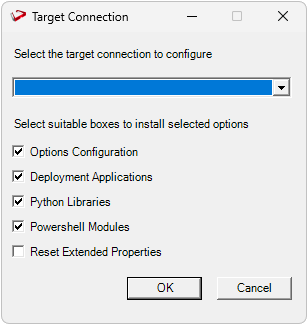
The user will be directed to the window below, where they have to select the target connection to be configured. Additionally, by deselecting the provided options, the user can choose not to install a particular option. "Reset Extended Properties" is deselected by default.
You will be directed to below PowerShell window. Provide the directory that contains unzipped Enablement Pack.
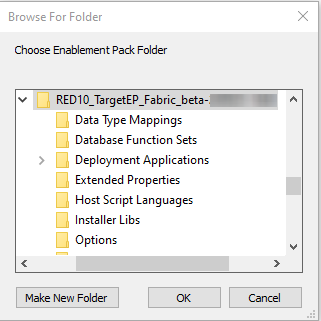
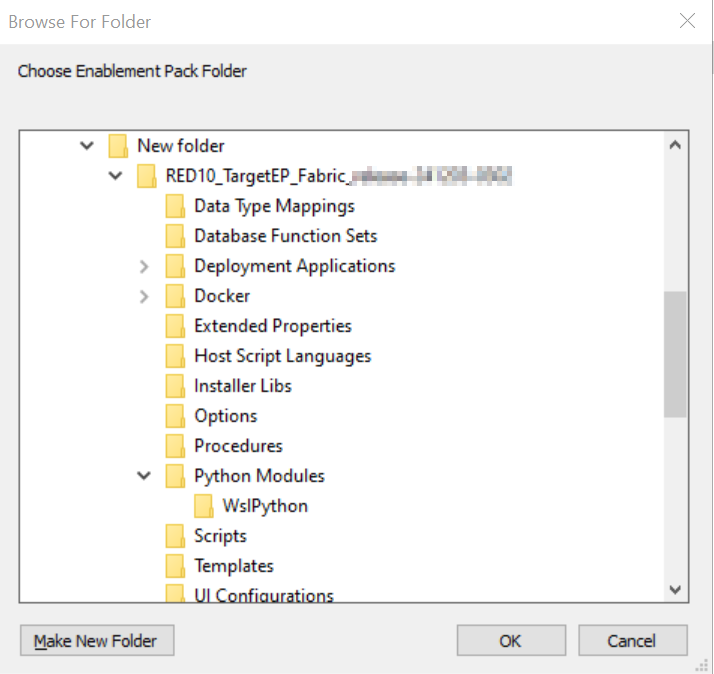
Press OK
The user will be directed to the window below, where they have to select the Create new profile or use existing one option.
...
If you have RED 10.x or higher installed but the script (Setup_Enablement_Pack.ps1) fails to find it on you system then you are most likely running PowerShell (x86) version which does not show installed 64 bit apps by default. Please open a 64 bit version of Powershell instead and re-run the script.
Table name should be given in lowercase only
While loading the table, the table name should be given in lowercase, for example, load_tablename; otherwise, loaded data will now get displayed.