開発環境には DF_WRAPO という名前のジェネリックな 5250 フォーム・ラッパーが含まれています。
RAMP 到着スクリプト内で以下のようにすることで、5250 画面とラッパーとして利用することができます。
SHOW_CURRENT_FORM(true,"DF_WRAPO");
これを実行すると、次のようになります。
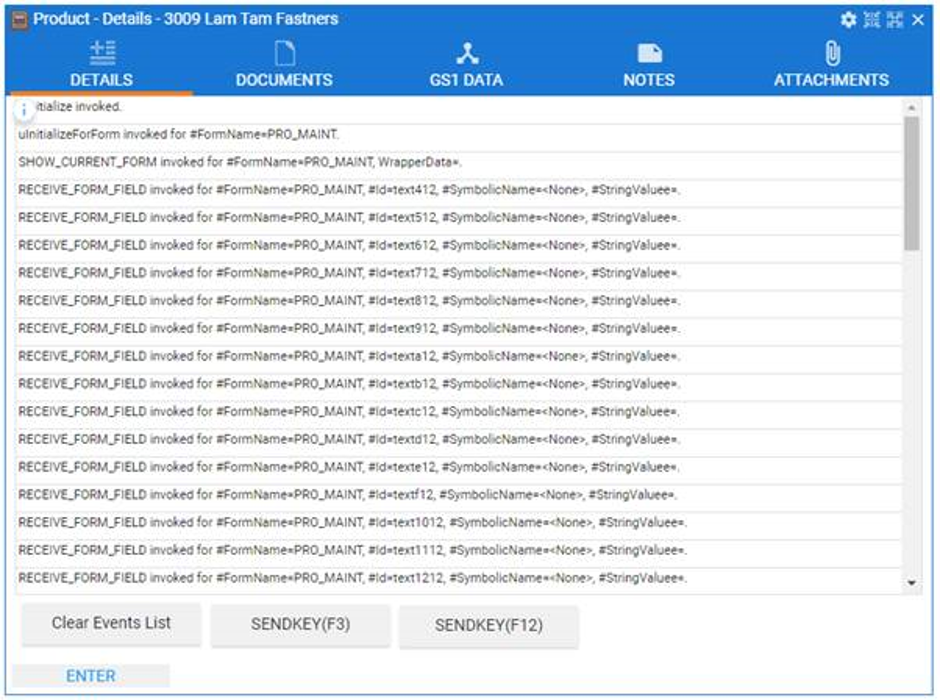
DF_WRAPO を利用して、ラッパーがどのように実行されるかを理解でき、異常な状況のトレースを行うこともできます。
DF_WRAPO が利用できない場合は、次のソースコードから Visual LANSA の再利用可能パーツで同様のものを作成することができます。
以下のコードの青字の部分があるため、このラッパーはジェネリックとして作動します。
*-------------------------------------------------------------------------------------------
*This is a generic RAMP 5250 form wrapper that can be used for testing/debugging
Begin_Com Role(*EXTENDS #VF_AC038O) Height(550) Width(680) Verticalscroll(True) Horizontalscroll(True) Layoutmanager(#MainPanelAttachmentManager)
*-------------------------------------------------------------------------------------------Define_Com Class(#Prim_atli) Name(#AttachEventsList) Parent(#MainPanelAttachmentManager) Manage(#EventsList) Attachment(Center) Marginbottom(4) Marginleft(4) Marginright(4)Define_Com Class(#Prim_atli) Name(#AttachButtonPanel) Parent(#MainPanelAttachmentManager) Attachment(Bottom) Marginbottom(4) Marginleft(4) Marginright(4) Manage(#Buttonpanel)
*-------------------------------------------------------------------------------------------------------------Define_Com Class(#Prim_List) Name(#EventsList) Parent(#COM_OWNER) Displayposition(1) Tabposition(1) Height(492) Left(4) Top(0) Width(672) Autoselectitem(False) Columnheaderheight(0) Columnlines(False) Columnsortarrow(False)Define_Com Class(#Prim_List.String) Name(#EventText) Parent(#EventsList) Columnwidth(1) Columnunits(Proportion) Wordwrap(True) Style(#SmallFont)Define_Com Class(#Prim_Panl) Name(#Buttonpanel) Parent(#COM_OWNER) Displayposition(2) Tabposition(2) Left(4) Top(496) Width(672)Define_Com Class(#Prim_MD.RaisedButton) Name(#ClearEvents) Parent(#Buttonpanel) Displayposition(3) Tabposition(3) Top(3) Width(155) Caption('Clear Events List') Left(6)Define_Com Class(#Prim_MD.RaisedButton) Name(#SendF3) Parent(#Buttonpanel) Displayposition(2) Tabposition(2) Top(4) Width(155) Caption('SENDKEY(F3)') Left(170)Define_Com Class(#Prim_MD.RaisedButton) Name(#SendF12) Parent(#Buttonpanel) Displayposition(1) Tabposition(1) Top(5) Width(155) Caption('SENDKEY(F12)') Left(333)
*-------------------------------------------------------------------------------------------Define_Com Class(#Prim_vs.Style) Name(#SmallFont) Fontsize(11) Fontunits(Pixel)
*-------------------------------------------------------------------------------------------Evtroutine Handling(#ClearEvents.Click)Clr_List Named(#EventsList)Endroutine
*-------------------------------------------------------------------------------------------Evtroutine Handling(#SendF12.Click)#COM_OWNER.SENDKEY Key(F12)Endroutine
*-------------------------------------------------------------------------------------------Evtroutine Handling(#SendF3.Click)#COM_OWNER.SENDKEY Key(F3)Endroutine
*-------------------------------------------------------------------------------------------Mthroutine Name(AddEvent)Define_Map For(*INPUT) Class(#prim_dc.UnicodeString) Name(#Text)Add_Entry To_List(#EventsList)#EventText.CurrentItem.Value := #TextEndroutine
*-------------------------------------------------------------------------------------------Mthroutine Name(uInitialize) Options(*REDEFINE)
*
*Set up to notify all field arrivals, even when they are not registered/defined to be received.* #COM_OWNER.avNotifyAllFieldArrivals := True*
*Do the ancestor thing#COM_ANCESTOR.uInitialize
*Record event#COM_OWNER.AddEvent Text("uInitialize invoked.")
*Add your logic here ...Endroutine
*-------------------------------------------------------------------------------------------Mthroutine Name(uTerminate) Options(*REDEFINE)
*Record event#COM_OWNER.AddEvent Text("uTerminate invoked.")
*Add your logic here ...
*Do the ancestor thing#COM_ANCESTOR.uTerminateEndroutine
*-------------------------------------------------------------------------------------------Mthroutine Name(uInitializeForForm) Options(*REDEFINE)
*This is called just the first time this form arrives#COM_ANCESTOR.uInitializeForForm Formname(#FormName)
*Record event#COM_OWNER.AddEvent Text("uInitializeForForm invoked for #FormName=" + #FormName + ".")Endroutine
*-------------------------------------------------------------------------------------------Mthroutine Name(SHOW_CURRENT_FORM) Options(*REDEFINE)
*Record event#COM_OWNER.AddEvent Text("SHOW_CURRENT_FORM invoked for #FormName=" + #FormName + ", WrapperData=" + #WrapperData + ".")
*This will trigger RECEIVE_FORM_FIELD and RECEIVE_SUBFILE_CELL executions for received form data#COM_ANCESTOR.SHOW_CURRENT_FORM Formname(#FormName) Wrapperdata(#WrapperData)Endroutine
*-------------------------------------------------------------------------------------------Mthroutine Name(RECEIVE_FORM_FIELD) Options(*REDEFINE)If (#SymbolicName = "")#SymbolicName := *MTXTVF_NONEEndif#COM_OWNER.AddEvent Text("RECEIVE_FORM_FIELD invoked for #FormName=" + #FormName + ", #Id=" + #Id + ", #SymbolicName=" + #SymbolicName + ", #StringValuee=" + #Stringvalue + ".")Endroutine
*-------------------------------------------------------------------------------------------Mthroutine Name(RECEIVE_SUBFILE_CELL) Options(*REDEFINE)If (#SymbolicName = "")#SymbolicName := *MTXTVF_NONEEndif#COM_OWNER.AddEvent Text("RECEIVE_SUBFILE_CELL invoked for #FormName=" + #FormName + ", #Id=" + #Id + ", #SymbolicName=" + #SymbolicName + ", #SubfileIndex=" + #SubfileIndex.AsString + ", #StringValuee=" + #Stringvalue + ".")Endroutine End_Com