画面ラッパーは、非表示の5250画面から値を取得し、まったく異なる方法でその値を表示します。この例では、IBM i のディスク使用量を図で表示します。
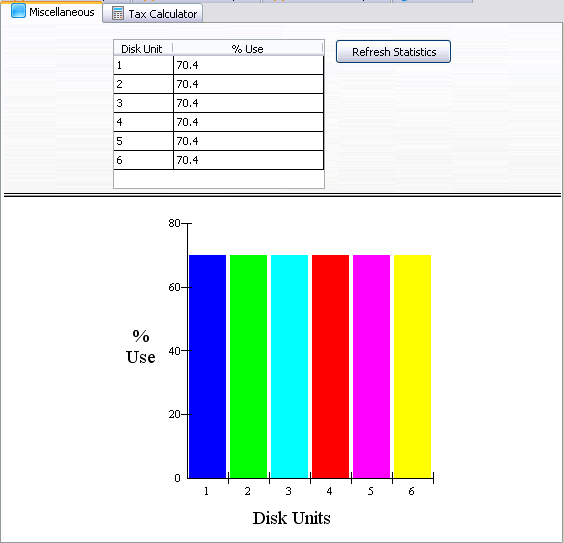
Work with Disk Status 画面にアクセスするには、コマンド行にwrkdskstsと入力します。この例で、Work with Disk Status画面に指定された名前は「DiskStatus」です。
Disk Status画面では、サブファイルの%Use列を読み取り、グラフにそのデータを入力します。
     Function Options(*DIRECT)

     Begin_Com Role(*EXTENDS #VF_AC010) Height(559) Hint(*MTXTDF_DET1) Layoutmanager(#ATLM_1) Width(557)

     Define_Com Class(#PRIM_GRID) Name(#DiskSts) Displayposition(1) Height(150) Left(109) Parent(#PANL_2) Rowheight(19) Tabposition(1) Top(15) Width(212)
     Define_Com Class(#PRIM_GDCL) Name(#GDCL_1) Caption('Disk Unit') Captiontype(Caption) Displayposition(1) Parent(#DiskSts) Source(#VF_ELTYP) Width(29)
     Define_Com Class(#PRIM_GDCL) Name(#GDCL_2) Caption('% Use') Captiontype(Caption) Displayposition(2) Parent(#DiskSts) Readonly(False) Source(#VF_ELTXTS) Width(30) Widthtype(Remainder)

     Define_Com Class(#PRIM_GRPH) Name(#GRPH_1) Displayposition(1) Height(370) Left(0) Parent(#PANL_3) Scatterstyle(SymbolAtPoints+Solid) Surfacestyle(ConnectLinesInBlack) Tabposition(1) Top(0) Width(557) Xcaption('Disk Units') Ycaption('% Use')
     Define_Com Class(#PRIM_GRCL) Name(#GRCL_1) Columnrole(Label) Displayposition(1) Parent(#GRPH_1) Source(#VF_ELTYP)
     Define_Com Class(#PRIM_GRCL) Name(#GRCL_2) Columnsymbol(HollowUpTriangle) Displayposition(2) Parent(#GRPH_1) Source(#VF_ELWIDP)

     Define_Com Class(#vf_sy122) Name(#myscreen_wrapper) Displayposition(3) Height(513) Left(144) Parent(#PANL_1) Top(24) Visible(False) Width(593)

     Define_Com Class(#PRIM_PANL) Name(#PANL_1) Displayposition(1) Height(559) Layoutmanager(#SPLM_1) Left(0) Parent(#COM_OWNER) Tabposition(1) Tabstop(False) Top(0) Width(557)

     Define_Com Class(#PRIM_ATLM) Name(#ATLM_1)
     Define_Com Class(#PRIM_ATLI) Name(#ATLI_1) Attachment(Center) Manage(#PANL_1) Parent(#ATLM_1)

     Define_Com Class(#PRIM_SPLM) Name(#SPLM_1)

     Define_Com Class(#PRIM_PANL) Name(#PANL_2) Displayposition(1) Height(181) Layoutmanager(#FWLM_1) Left(0) Parent(#PANL_1) Tabposition(2) Tabstop(False) Top(0) Width(557)
     Define_Com Class(#PRIM_PANL) Name(#PANL_3) Displayposition(2) Height(370) Layoutmanager(#ATLM_2) Left(0) Parent(#PANL_1) Tabposition(3) Tabstop(False) Top(189) Width(557)

     Define_Com Class(#PRIM_SPLI) Name(#SPLI_1) Manage(#PANL_2) Parent(#SPLM_1) Weight(1)
     Define_Com Class(#PRIM_SPLI) Name(#SPLI_2) Manage(#PANL_3) Parent(#SPLM_1)
     Define_Com Class(#PRIM_ATLM) Name(#ATLM_2)
     Define_Com Class(#PRIM_ATLI) Name(#ATLI_2) Attachment(Center) Manage(#GRPH_1) Parent(#ATLM_2)
     Define_Com Class(#PRIM_FWLM) Name(#FWLM_1) Direction(TopToBottom) Flowoperation(Center) Margintop(15) Spacingitems(2)
     Define_Com Class(#PRIM_FWLI) Name(#FWLI_3) Manage(#DiskSts) Parent(#FWLM_1)

     Define_Com Class(#PRIM_PHBN) Name(#PHBN_1) Caption('Refresh Statistics') Displayposition(2) Left(331) Parent(#PANL_2) Tabposition(2) Top(15) Width(117)

     Define_Com Class(#PRIM_FWLI) Name(#FWLI_6) Manage(#PHBN_1) Parent(#FWLM_1)

     * =============================================================================================
     * This example shows a graph with the percentage of activity of each of the IBM i disk units
     * =============================================================================================
     Mthroutine Name(uInitialize) Options(*REDEFINE)

     * Do any initialization defined in the ancestor

     Invoke Method(#Com_Ancestor.uInitialize)

     Set Com(#grph_1) Graphtype(Bar)

     Set Com(#myscreen_wrapper) Ucommand(#com_owner)

     Endroutine

     Mthroutine Name(uExecute) Options(*REDEFINE)

     * Do any execution logic defined in the ancestor

     Invoke Method(#Com_Ancestor.uExecute)
     Invoke Method(#myscreen_wrapper.MakeRampTSAvailable)

     Endroutine

     Evtroutine Handling(#myscreen_wrapper.RampTSAvailable)

     * Clear the lists
     Clr_List Named(#DiskSts)
     Clr_List Named(#grph_1)

     * Run teh scripts to navigate to work with disk status
     * The navigation only involves 3 screens: Login -> IBM i main menu, type wrkdsts in teh command line -> Destination Work with disk status.

     Invoke Method(#myscreen_wrapper.navigatetoscreen) Name(wrkdsksts)

     Endroutine

     Evtroutine Handling(#myscreen_wrapper.vHandleArrive) Arrivedscreen(#CurrentScreen) Previousscreen(#PreviousScreen) Arrivedpayload(#Payload)

     Define_Com Class(#prim_boln) Name(#MoreRecords)

     Case (#CurrentScreen)

     When Value_Is(= wrkdsksts)

     * Payloads are destroyed when the ARRIVE script finishes executing.
     * The payload is set to FIRST_ARRIVAL when teh enter key is sent in IBM i main menu to differentiate what caused the screen to arrive:
     *    SETVALUE("cmdline","wrkdsksts")
     *    SENDKEY(KeyEnter, "FIRST_ARRIVAL");
     * The same screen can arrive after sending the F10 or an F5, so we set payload to indicate so
     If (#Payload = RESTART_STATS)

     #myscreen_wrapper.sendkey Key(#myscreen_wrapper.KeyF5) Payload(REFRESH_STATS)

     Else

     If (#Payload = FIRST_ARRIVAL)

     #myscreen_wrapper.sendkey Key(#myscreen_wrapper.KeyF10) Payload(RESTART_STATS)

     Else

     #com_owner.uGetSubfilePage

     Endif

     Endif

     Endcase
     Set Com(#myscreen_wrapper) Visible(False)
     Endroutine

     * When RAMP-TS encounters screens like WRKDSKSTS or WRKACTJOB, it does not recognise the lists on them as subfiles (because they are not actually subfiles).
     * Instead they are recognised as multiple fields.
     * However, your scripts can still process them similarly to lists, as long as you follow a naming standard when naming the fields.
     * In our WRKDSKSTS screen we identified the first column as UNITn and the fourth column as USEDn

     Mthroutine Name(uGetSubfilePage)

     #listcount := 1

     Dowhile (#myscreen_wrapper.check_field_exists( ("USED" + #listcount.asstring) ))

     #myscreen_wrapper.getvalue From("UNIT" + #listcount.asstring) Value(#vf_eltyp)
     #myscreen_wrapper.getvalue From("USED" + #listcount.asstring) Value(#vf_eltxts)
     #VF_ELWIDP := #vf_eltxts.trim.asnumber

     Add_Entry To_List(#DiskSts)
     Add_Entry To_List(#grph_1)

     #listcount += 1

     Endwhile

     Endroutine


     Mthroutine Name(uTerminate) Options(*REDEFINE)

     * Do any termination defined in the ancestor

     Invoke Method(#Com_Ancestor.uTerminate)


     Endroutine

     * Refresh statistics
     Evtroutine Handling(#PHBN_1.Click)

     Invoke Method(#myscreen_wrapper.MakeRampAvailable) Foraction(RampTSAvailable)

     Endroutine

     End_Com