This step analyses the structure of the layout XSL, to explain what the main parts of the program are doing.
- WAMs use the XSL Transformation language (XSLT) to process the XML output by a WebRoutine to produce a web page – an XHTML document. You can learn more about XSL at the www.w3schools.com web site.
The first few lines of code, define the XSL namespace standards used in the document.<?xml version="1.0" encoding="UTF-8"?>
<!-- (c) 2003, 2011 LANSA -->
<!-- XHTML WAM Layout -->
<!-- $Revision:: 12 $ -->
<xsl:transform version="1.0" exclude-result-prefixes="lxml wd tsml"
xmlns:xsl="http://www.w3.org/1999/XSL/Transform"
xmlns:lxml="http://www.lansa.com/2002/XML/Runtime-Data"
xmlns:wd="http://www.lansa.com/2002/XSL/Weblet-Design"
xmlns:tsml="http://www.lansa.com/2002/XML/Generation-Metadata"
xmlns="http://www.w3.org/1999/xhtml">
XSL code such as<xsl:if . . .>has a namespace ofxsland is a standard defined by the World Wide Web consortium.
XSL code such as<wd:external-resources. . .>has a namespace ofwdand is LANSA defined standard. - The <xsl:import . ./> statements, import other weblets into this layout:
<!-- Standard imports                                       -->
   <!-- Import the weblet XSL files used by your layout here   -->
   <!-- e.g.                                                   -->
   <xsl:import href="std_variables.xsl" />
   <xsl:import href="std_types.xsl" />
   <xsl:import href="std_hidden.xsl" />
   <xsl:import href="std_style_v2.xsl" />
   <xsl:import href="std_script.xsl" />
   <xsl:import href="std_messages.xsl" />
   <xsl:import href="std_menubar.xsl" />
   <xsl:output method="xml" omit-xml-declaration="yes" encoding="UTF-8"
               indent="no" doctype-public="-//W3C//DTD XHTML 1.0 Strict//EN"
               doctype-system="http://www.w3.org/TR/xhtml1/DTD/xhtml1-strict.dtd" />
When the messages and menu bar weblets were added to this layout in the graphical editor, import statements for std_messages.xsl and std_menubar.xls were added. - The XSL statements which begin wd are LANSA weblet design statements which are used within LANSA's graphical web page editor (actually an XSL editor). wd is a LANSA namespace.
<wd:external-resources>
      <wd:style name="XWT08J" />
      <wd:style name="XWT08L101" />
      <wd:style name="IIILAY01" />
   </wd:external-resources>
   <wd:definition>
      <wd:default-theme />
      <wd:group name="Layout Weblets" />
   </wd:definition>
   <wd:template name="iii_layout">
      <wd:description icon="icons/std_layout.ico">
         <wd:name lang="ENG">iii Acme Layout</wd:name>
      </wd:description>
   </wd:template>
The external resources will define links to external style sheets to be used by web pages based on this layout.
These tags also provide a name, description, group name and icon to be used for this weblet in the Repository.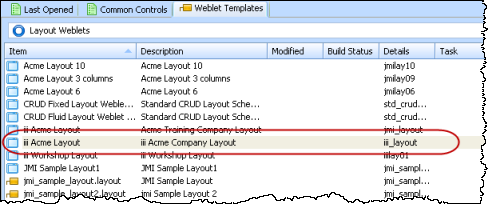
- xsl:templates are like subroutines. They can be called, passing parameters into the template.
<xsl:template name="iii_layout" wd:role="std:layout">
When you compile a WAM using this Layout Weblet, the generated WAM layout uses the layout weblet specified. When you then design a WebRoutines's web page, these parameters will be shown on the Details tab and could be set at design time and or at runtime.
<xsl:param name="window_title"
select="$lweb_context/lxml:webapplication-title"
wd:type="std:mtxt_variable" wd:tip_id="" />
<xsl:param name="has_form" select="true()" wd:type="std:boolean"
wd:tip_id="" />
<xsl:param name="show_title" select="true()" wd:type="std:boolean"
wd:tip_id="" />
<xsl:param name="title_text" select="$lweb_context/lxml:webroutine-title"
wd:type="std:mtxt_variable" wd:tip_id="" />
<xsl:param name="javascript_files" select="''" wd:tip_id="" />
<xsl:param name="jQueryNoConflict" select="false()" wd:type="std:boolean"
wd:tip_id="" />
<xsl:param name="css_files" select="''" wd:tip_id="" />
<xsl:param name="output_charset"
select="/lxml:data/lxml:server-instructions/lxml:client-charset"
wd:tip_id="" />
<xsl:param name="backcompat_theme" select="false()" wd:type="std:boolean"
wd:tip_id="" />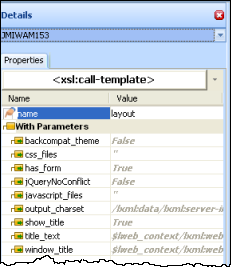
- The XHTML definition begins here. Note that an xsl:if is testing the value of an environment language variable ($lweb_ISO_language). Further down another xsl:if refers to $window_title which is the value of a boolean input parameter.
<html>
         <xsl:if test="$lweb_ISO_language != ''">
            <xsl:attribute name="xml:lang">
               <xsl:value-of select="$lweb_ISO_language" />
            </xsl:attribute>
            <xsl:attribute name="lang">
               <xsl:value-of select="$lweb_ISO_language" />
            </xsl:attribute>
         </xsl:if>
         <head>
            <title>
               <xsl:value-of select="$window_title" />
            </title>
            <xsl:choose>
               <xsl:when test="$backcompat_theme">
                  <xsl:call-template name="style">
                     <xsl:with-param name="theme_css_filename" select="''" />
                     <xsl:with-param name="css_files" select="$css_files" />
                  </xsl:call-template>
               </xsl:when>
               <xsl:otherwise>
                  <xsl:call-template name="style">
                     <xsl:with-param name="theme_css_filename" select="'none'" />
                     <xsl:with-param name="css_files" select="$css_files" />
                  </xsl:call-template>
               </xsl:otherwise>
            </xsl:choose>
            <xsl:call-template name="script">
               <xsl:with-param name="javascript_files"
                               select="$javascript_files" />
               <xsl:with-param name="trap_script_errors" select="false()" />
               <xsl:with-param name="jQueryNoConflict"
                               select="$jQueryNoConflict" />
            </xsl:call-template>
         </head>
This code defines the contents of the head area of the web page. The XSL logic is generating XHTML based on the parameters provided at runtime. - Your page content is output within the HTML <body></body> tags.
<body class="acme_layout">
            <xsl:variable name="containerName">
               <xsl:choose>
                  <xsl:when test="$has_form">
                     <xsl:text>form</xsl:text>
                  </xsl:when>
                  <xsl:otherwise>
                     <xsl:text>div</xsl:text>
                  </xsl:otherwise>
               </xsl:choose>
            </xsl:variable>
            <xsl:element name="{$containerName}">
               <xsl:attribute name="id">lpage_container</xsl:attribute>
               <xsl:if test="$has_form">
                  <xsl:attribute name="onsubmit">return _HandleDefaultSubmit(this);</xsl:attribute>
                  <xsl:attribute name="method">post</xsl:attribute>
                  <xsl:attribute name="name">LANSA</xsl:attribute>
                  <xsl:attribute name="action">
                     <xsl:value-of select="$lweb_context/lxml:action-request" />?</xsl:attribute>
                  <xsl:call-template name="hidden_fields" />
               </xsl:if>
Thexsl:choose logic(like an RDML CASE loop) outputs a <form> tag or a <div> depending on the variable $has_form. Has_form is a property of the layout, and is shown on the Properties sheet on the Design tab. - This section is largely the code which you provided and represents the design of your web page, when combined with the necessary stylesheet.
<div id="acme_header">
                  <span style="margin-left:10px; padding-top:0px">
                     <h1>Acme IT Services</h1>
                  </span>
                  <br />
                  <span style="margin-left: 20px">
                     <h2>Software for Business</h2>
                  </span>
                  <div id="lpage_navBar">
                     <xsl:call-template name="std_menubar">
                        <xsl:with-param name="menu_items"
                                        select="document('')/*/lxml:data/lxml:menu[@id='E449B9B6900F4392AF69DE5097BB506E']" />
                        <xsl:with-param name="name"
                                        select="concat('o', position(), '_LANSA_17914')" />
                        <!-- <xsl:with-param name="listname" select="?" /> -->
                        <!-- <xsl:with-param name="orientation" select="?" /> -->
                        <!-- <xsl:with-param name="show_arrows" select="?" /> -->
                        <!-- <xsl:with-param name="submit_selected_to" select="?" /> -->
                     </xsl:call-template>
                  </div>
               </div>
               <div id="acme_footer">
                  <span style="margin-left: 10px; padding-top:5px">© Acme Ltd 2011</span>
               </div>
               <div id="acme_sidebar"></div>
               <div id="acme_content">
                  <div id="acme_messagesContainer">
                     <xsl:call-template name="messages">
                        <!-- <xsl:with-param name="target_window_name" select="?" /> -->
                     </xsl:call-template>
                  </div>
                  <xsl:if test="$show_title">
                     <h2 class="title">
                        <xsl:value-of select="$title_text" />
                     </h2>
                  </xsl:if>
                  <xsl:apply-templates select="*" />
               </div>
            </xsl:element>
         </body>
This code also includes the menu bar and messages weblets which you added using the graphical editor.
The<xsl:apply-templates select="*" />outputs your WebRoutine fields and lists, together with output from any weblets which were added to the page, such as Push Buttons.