A job can be started by right-clicking the job in the Scheduler window and then choosing Start the Job from the context menu.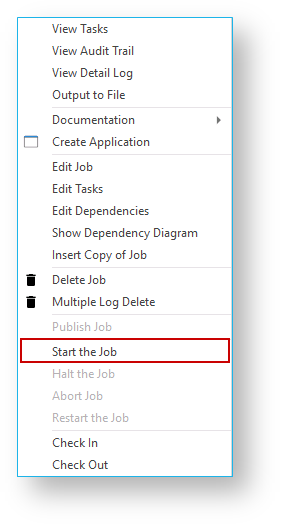
You can also start a job directly from the Azkaban Dashboard by navigating to the Flow in Azkaban and clicking Execute Flow.
Flow Property Override
Please read the following section if executing Flows directly in Azkaban
Flow Property Override
When running WhereScape Jobs (Flows) Directly from Azkaban you can override global properties for a job.
When running Jobs directly from the Azkaban Dashboard the Maximum Threads setting in RED is not used and instead tasks which can run in parallel will be started until the max thread count specified for the Executor (azkaban.local.properties, property flow.num.job.threads) is reached. This could of course overload your scheduler if you have many tasks within the job which can run concurrently.
The workaround for this situation is to add a Flow Property Override in the Flow Parameters for the property flow.num.job.threads when running the Job directly to restrict the thread count down from the default max.
Note that Jobs run from the RED UI Scheduler tab already set this flow property to the number of threads specified in the RED Job, so it is safest to execute the job from RED rather than Azkaban for this reason. See the Scheduler section for other performance and resource tuning tips.