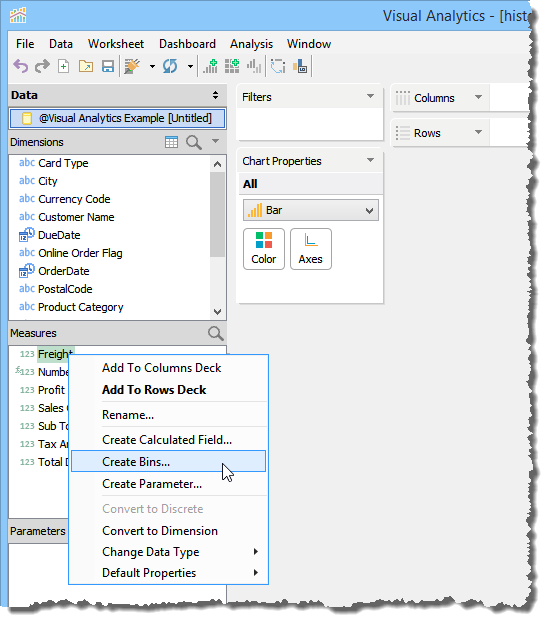
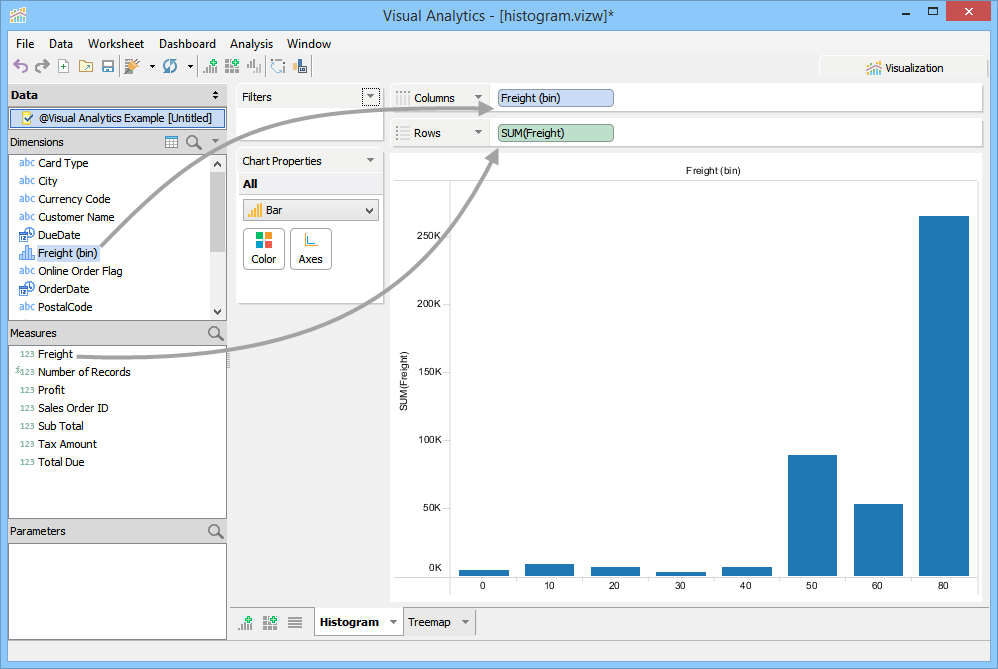
A simple Histogram can be created by creating Bins for a Measure, then dragging that Measure's Bins into the Columns Deck, then dragging the measure itself into the Rows Deck.
1. Execute a select * within the query analyzer on the bistudio_example.xlsx file
2. Click the [Visual Analytics] icon in the Query Analyzer Grid Results toolbar.
3. Right-click on Freight in the Measures pane and select [Create Bins...]
4. Choose [Size of bins] and enter 10 in the input field of the [Create Bins] dialog and click OK.
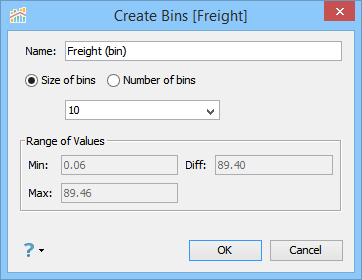
See Bins for more on how to edit and create Bins. |
5. After your Bins for Freight are created, select Bar from the Chart Type dropdown in the Chart Properties
6. Drag Freight into the Rows Deck.
7. Drag the "Freight (bin)" bins for the Freight Measure (which you created in step #3) from the Dimensions Pane into the Columns Deck.
Bins are easily identified in the Dimensions pane because of their unique vertical bars icon. |
8. A histogram will appear in the View area with each bar representing a Bin. The label at the bottom of the bar designates each Bin's minimum value.
Other actions that you can perform on a plotted histogram are as follows: