You start creating an application by creating a form or a dialog. The dialog will become your application's window when it is running.
To create a form select New from the File tab, then select Dialog from the New list.
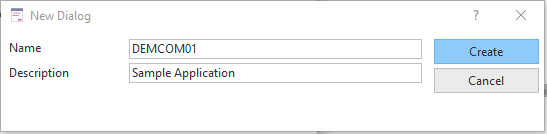
The New Dialog is displayed. Enter the name and the description:
Click the Create button.
If you now bring up the Source view, you will notice that the component definition statement for the form has been created automatically.
     Begin_Com Role(*EXTENDS #PRIM_DLG)
     End_Com
A Visual LANSA application always starts with a FUNCTION statement followed by a BEGIN_COM statement defining the form.
The END_COM statement ends the component definition. It is always the last statement in a Visual LANSA application.
Note that if the standard form (STD_FORM) definition on your system has been modified, you may see other statements as well. For more information, refer to Modify Default Component Behavior in 2.4 Work with Components.