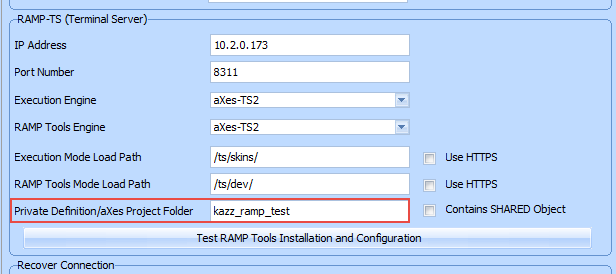
When you define a RAMP-TS server in the framework, this subfolder name is specified as a private working set. Screen definitions may be divided up like this on an indivisible and completely independent project basis.
By default RAMP-TS stores your screens in a folder named /ts/screens.
Each screen definition is stored in a file named N.scn (eg: 1.scn, 2.scn, 3.scn, etc). They contain JSON fragments that define the characteristics of the screen.
These files are only required during development. For run time, all of these files are published in a single consolidated file named screens.jsn. Screen.jsn is the only screen file that needs to be deployed to production environments.
Your screen definitions do not have to be in /ts/screens, you can divide up screen definitions into sub-folders like /ts/screens/Project1 or /ts/screens/Project2.
You just input the folder name (Project1) with nothing else. It is implicit that this is a sub-folder of /ts/screens:
When you define a RAMP-TS server in the framework, this subfolder name is specified as a private working set. Screen definitions may be divided up like this on an indivisible and completely independent project basis.
Screens should never be divided up on a unit of work or developer basis because you must not copy, move, rename or delete them.