To achieve this objective, you will complete the following steps:
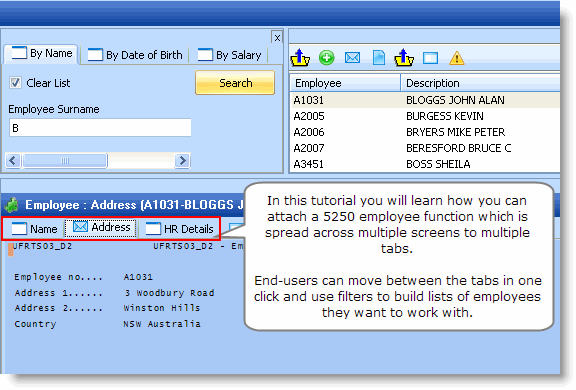
RAMP-TS 5250 destination screens are displayed on framework command handler tabs. Typically just one screen is displayed on a command handler tab. However it is possible to split multiple screens up across multiple tabs. This tutorial covers the concepts and skills required to do this.
To achieve this objective, you will complete the following steps:
RAMP-WINAD06 Step 1. A Multiple 5250 Screen Scenario
RAMP-WINAD06 Step 2. Name the Screens
RAMP-WINAD06 Step 3. Classify the Screens
RAMP-WINAD06 Step 4. Review and Understand the Targets List
RAMP-WINAD06 Step 5. Using Multiple Command Handler Tabs
RAMP-WINAD06 Step 6. Review and Alter Buttons and Function Keys
RAMP-WINAD06 Step 7. Review the value you have added to the 5250 application
RAMP-WINAD06 Appendix: Function UFRTS03
The following are assumed knowledge for the commencement of this tutorial. You need to: