Screen
Name You Should Use
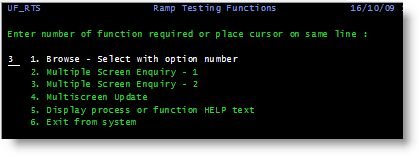
RAMP Testing Functions menu
UF_RTS
Also name the option field txtOption.
If you are completing this tutorial in a classroom setting, you will need to select option 3 in the RAMP Testing Functions menu to bring up the correct screens:
Request "Key" Screen
UFRTS03_R1
Also name the employee number field used in navigation as txtEmpNo
Display "Data" Screen 1
UFRTS03_D1
Display "Data" Screen 2
UFRTS03_D2
Display "Data" Screen 3
UFRTS03_D3