Note: With a component selected on the Design view, the Layout ribbon is showing both table settings and Item settings:

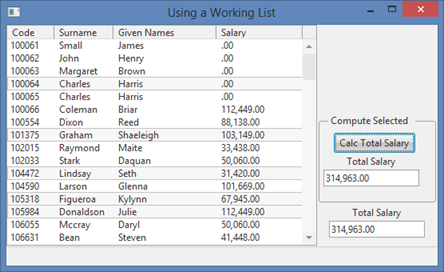
In this step, you will add another copy of the iiiTotalSalary field to the form and a push button. Clicking a push button will read through the List View EMPLOYS using a SELECTLIST/ENDSELECT command and total the currently selected entries into the new total field.
1. Drop a Group Box on the right-hand side of your form. Adjust its size as shown in the image below.
a. On the Layout ribbon, give it an Alignment of the Bottom Center and a Flow of Up.
Note: With a component selected on the Design view, the Layout ribbon is showing both table settings and Item settings:
|
b. Give it a Size of Fit to Width.
c. Change its margin Bottom to 10.
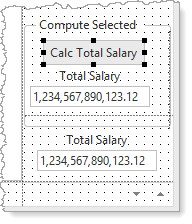
d. On the Details tab, change its Caption to Compute Selected.
2. Drag and drop field iiiTotalSalary into the group box. Note that it will be renamed to iiiTotalSalary1.
a. Change its LabelPosition to Top.
b. Change its Width to 120 pixels.
3. Drag a push button into the group box.
a. Change its Name to Compute and Caption to Calc. Total Salary.
b. Adjust the Width of the button.
c. Create a Compute.Click event routine.
Your design should look like the following:
4. In this step, you will complete the Compute button Click event logic. SELECTLIST/ENDSELECT should read all entries in the list component.
a. The selected entries can be identified by using their CurrentItem property. Entries in a list are themselves a component. CurrentItem has a Selected property (true or false).
b. Press F2 on a component to discover all its events, properties, and methods, and then double click on anyone to locate the detailed help associated with each of these.
c. Expand CurrentItem and expand PRIM_LVIT to see the events, properties, and methods of a list Item:
d. Expand the list Item properties. Double click the Selected property to see its help in the browser:
The following code will accumulate SALARY into iiiTotalSalary1 for selected items:
Evtroutine Handling(#Compute.Click)
#iiiTotalSalary1 := *zeroes
Selectlist Named(#Employs)
If (#Employs.CurrentItem.Selected = true)
#iiiTotalSalary1 += #xEmployeeSalary
Endif
Endselect
Endroutine
5. Add code to the Employs.ItemGotSelection and Employs.ItemLostSelection event routines to set iiiTotalSalary1 to zero.
6. Compile and test your form: