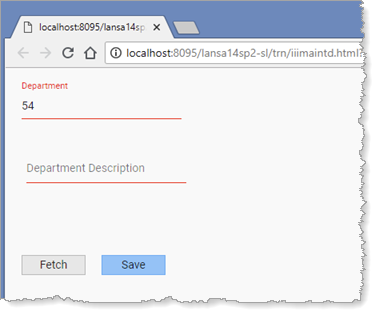
The field components have Methods, ShowError and ClearError. We will now add logic which uses this feature.
1. Create a Method routine name Errors. It should have an input Boolean value with the name Clear.
Your code should look like the following:
Mthroutine Name(Errors) Access(*PRIVATE) Define_Map For(*INPUT) Class(#PRIM_BOLN) Name(#Clear) Endroutine
The Define_Map statement defines a parameter For() *input, *output or *both.
2. When Clear is True, invoke ClearError for the input fields. Otherwise, invoke ShowError for each input field.
Your code should look like the following:
Mthroutine Name(Errors) Access(*PRIVATE) Define_Map For(*INPUT) Class(#PRIM_BOLN) Name(#Clear) If Cond(#clear) #xDepartmentCode.ClearError #xDepartmentDescription.ClearError Else #xDepartmentCode.ShowError #xDepartmentDescription.ShowError Endif Endroutine
3. Add code to the Save method to invoke the Errors routine.
Your code should look like the following:
Mthroutine Name(Save) Define_Com Class(#iiixDepartmentsDataServer.Save) Name(#SaveDepartment) #SaveDepartment.executeasync( #xDepartments #io£sts ) Evtroutine Handling(#SaveDepartment.Completed) If (#IO£STS = OK) #xDepartments := *default #COM_OWNER.Errors( True ) Else #COM_OWNER.Errors( False ) Endif Endroutine Endroutine
4. Compile and test your web page. When you try to Save a record with a blank description, the fields should be highlighted as shown:
5. Add a description and Save again. The fields should be cleared and return to their normal appearance.
You will handle error messages in a later step.