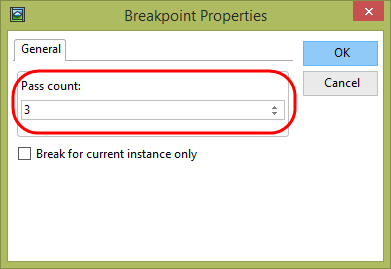
A breakpoint Pass Count property can be set, meaning only break every n executions of the command. In this step you will add a loop within the Save method and set a Pass Count on a command within this loop.
1. Ensure that you have ended the last debug session.
2. Add the highlighted code to the Save method routine as shown:
Mthroutine Name(Save) Define_Com Class(#iiixDepartmentsDataServer.Save) Name(#SaveDepartment) #SYS_MSGQ.ClearAll #SaveDepartment.executeasync( #xDepartments #io£sts ) Begin_Loop To(10) #std_count += 1 End_Loop . . . .
3. Compile your web page.
4. Set a Breakpoint on the assigned command (#std_count += 1).
Right click and select Breakpoint Properties from the context menu.
Set the Pass Count to 3 and click OK.
5. Execute the web page in debug. As before enter 100 to fetch a department record and then click Save. The program will not stop until the third execution.
Since the break is on the assigned statement (#std_count += 1), which has not yet executed when it breaks, you will find that the value of STD_COUNT is 2.
Press F5 to continue running. Debug will again stop when STD_COUNT = 3. Repeat and debug stops when STD_COUNT = 8.