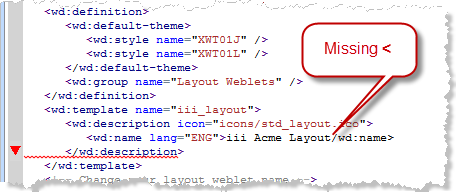
2. As you edit the XSL, the syntax will be checked, and any errors highlighted, for example:
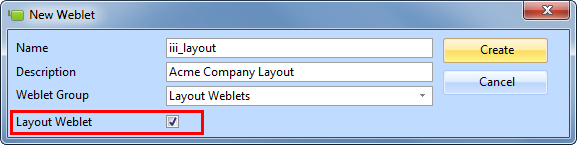
In this step you will create a new layout weblet. You will see that the "create new layout weblet" function provides a default layout. You will remove much of this content and replace it with code based on the test layout which you created in Step 1.
1. Use the New / Weblet dialog to create a layout weblet.
Name: iii_layout
Description: Acme Company Layout
Weblet Group: Layout Weblets
Select the Layout Weblet checkbox.
2. As you edit the XSL, the syntax will be checked, and any errors highlighted, for example:
3. Delete the inline style declaration <style></style>. Delete the style tags and everything between them.
This block of code begins, and occupies 29 lines:
<style type="text/css"> #lpage_container {
4. Towards the end of the XSL there are 7 <xsl:templates. . .> blocks of code, which need to be deleted.
They begin below the main template <xsl:template name="iii_layout:. . . . .</xsl:template> definition:
<xsl:template match="/lxml:data"> <xsl:template match="/lxml:data" mode="content.sidebar1"> <xsl:template match="/lxml:data" mode="content.sidebar2"> <xsl:template match="/lxml:data" mode="content.header"> <xsl:template match="/lxml:data" mode="content.navigation"> <xsl:template match="/lxml:data" mode="content.footer"> <xsl:template match="/lxml:data" mode="content.hidden">
Delete from the lines listed, up to and including their end tag </xsl:template>.
Note: Make sure you do not delete the </xsl:transform> at the end of the document. |
5. Save your changes.
6. Find the code shown below and mark it for retention by adding the comment lines shown around it.
New code is highlighted in red, italic.
| Hint: Search (Ctrl+F) for the first line shown using lpage_content_column. The other lines shown follow immediately after this. |
<!-- KEEP -->
<div id="lpage_content_column">
<div id="lpage_content" class="lpage_content_area"><xsl:if test="$show_title"><h2 class="title"><xsl:value-of select="$title_text" /></h2></xsl:if><div wd:content="content"><xsl:apply-templates select="*" /></div></div></div><!-- END KEEP -->
7. Above the code shown in 10. locate the following line. Delete this line, and everything up to your first <!—keep --> comment line.
<div id="lpage_header" wd:content="content.header">
| Hint: Move the cursor to the top of the XSL document and search (Ctrl+F) for lpage_header. |
8. The last step will have highlighted as an error, the </div> tag below your <!—end keep--> comment line. Delete this </div> and everything before:
</xsl:element>
| Note: Do not delete the line </xsl:element>. |
9. Save your changes. You should have no errors at this point.
10. With your new web page layout (created in step 1) open in Notepad:
a. Remove the text which you added from the web site: http://generator.lorem-ipsum.info/.
b. Copy all the code inside the <body></body> tags (not including the body tags) and paste in into your new WAM layout within the <body></body> tags. These are below the </xsl:if> and before <!—KEEP -->. Your code should look like the following.
Inserted code is shown in red.
</xsl:if>
<div id="acme_header">Heading</div>
<div id="acme_footer">footer</div>
<div id="acme_sidebar">
<div style="padding-top:400px">Left Panel</div>
</div>
<div id="acme_content">
<div id="acme_messagesContainer">
<h2>Messages</h2>
</div>
<h2>Form Content</h2>
</div>
<!-- keep -->
11. Change the class of the <body> tag to acme_layout. This line should now look like the following:
<body class="acme_layout">
12. Move the code (cut and paste) shown in red below, from within the block of xsl which you commented to keep, into the position shown, immediately before the <h2>Form Content</h2> line.
Move only the code shown in red.
div id="acme_header">Heading</div><div id="acme_footer">footer</div><div id="acme_sidebar"><div style="padding-top:400px">Left Panel</div></div><div id="acme_content"><div id="acme_messagesContainer"><h2>Messages</h2></div><xsl:if test="$show_title"><h2 class="title">
<xsl:value-of select="$title_text" /></h2></xsl:if><h2>Form Content</h2></div>
13. Move the code shown in red below from the xsl you commented to keep, into the position shown, below the <h2>Form Content</h2> line. The moved code is shown in red.
<div id="acme_header">Heading</div><div id="acme_footer">footer</div><div id="acme_sidebar"><div style="padding-top:400px">Left Panel</div></div><div id="acme_content"><div id="acme_messagesContainer"><h2>Messages</h2></div><xsl:if test="$show_title"><h2 class="title"><xsl:value-of select="$title_text" /></h2></xsl:if><h2>Form Content</h2><xsl:apply-templates select="*" />
</div>
14. Delete the remaining saved xsl. i.e everything which now remains within the comments <!—keep --> and <!—end keep -->.
15. Save your changes. At this point you have your basic layout defined. No stylesheet is associated with it except for the styles defined by the standard_style.xsl weblet.