1. Open the Begin WebRoutine in WAM iiiSecMaint in the Design view.
a. Add a new row to the table containing the Department AutoComplete weblet.
b. Set the left hand cell in the new row, to align left.
c. Add a button with image to the bottom left hand cell.
| Hint: If you have a problem selecting inside the table, select the push button and move the cursor right, to position in the table cell. Enter two * characters. Now right click and use Table Items / Add Rows… |
d. Delete the place holder characters.
2. Set up the New Section push button properties as shown:
Property | Value |
|---|---|
Caption |
|
left_relative_image |
|
On_click_WamName |
|
On_click_wrname |
|
submitExtraFields |
|
|
a. Adjust the width of the push button to display the caption as one line.
b. Save your changes.
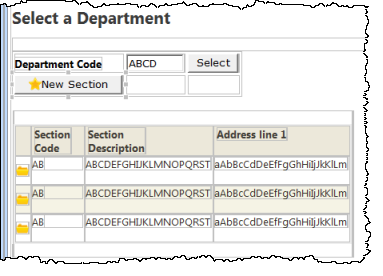
Your completed Begin page should look like the following:
3. Save these changes and run the Begin WebRoutine for WAM iiiSecMaint to test iiiSecAdd.