In order to successfully invoke the Run web service operation, your SOAP client application needs to know and implement the appropriate details in two categories. Refer to the following headings for more information:
You need to know about the web service in order to execute the correct protocols to invoke it. The most important items you need are:
LANSA Composer provides the LANSAComposerProcessingSequencesService.wsdl file that describes the service. This file can be found in the ./WebService/SOAP directory of the LANSA Composer data directory tree. For example, on an IBM i server, it can be found on the IFS in a location like this:
/LANSA_Composer_licpgmlib/lic/WebService/SOAP
The correct endpoint URL necessary to invoke the Run web service operation will depend on the specifics of the environment in which LANSA Composer server is installed.
The provided WSDL specifies the endpoint URL generically as follows:
http://SERVER:80/cgi-bin/jsmdirect?COMPOSER_RUNYou need to revise this for your system by:
For example, if LANSA Composer is installed on a Windows server named MYSERVER and the HTTP listener port in use is 8082, then your endpoint URL might look like this:
http://MYSERVER:8082/cgi-bin/jsmdirect.exe?COMPOSER_RUNYou need to know about the Processing Sequence that you wish to run:
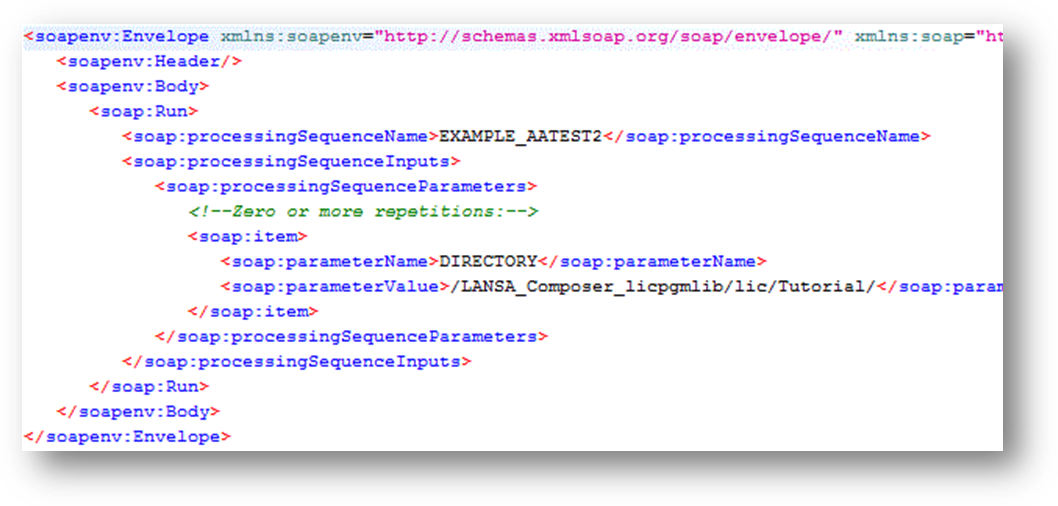
You must specify the Processing Sequence name in the processingSequenceName parameter for the Run web service operation. In the illustration below, the Processing Sequence name specified is EXAMPLE_AATEST2.
You must specify one parameterValue and, optionally, its parameterName for each Processing Sequence parameter for which you wish to specify a value. If you omit the parameter names, then LANSA Composer will match the values provided to the parameter names that are defined for the specified processing sequence by position. In the illustration below, one Processing Sequence parameter value is specified using the name DIRECTORY and the value shown.