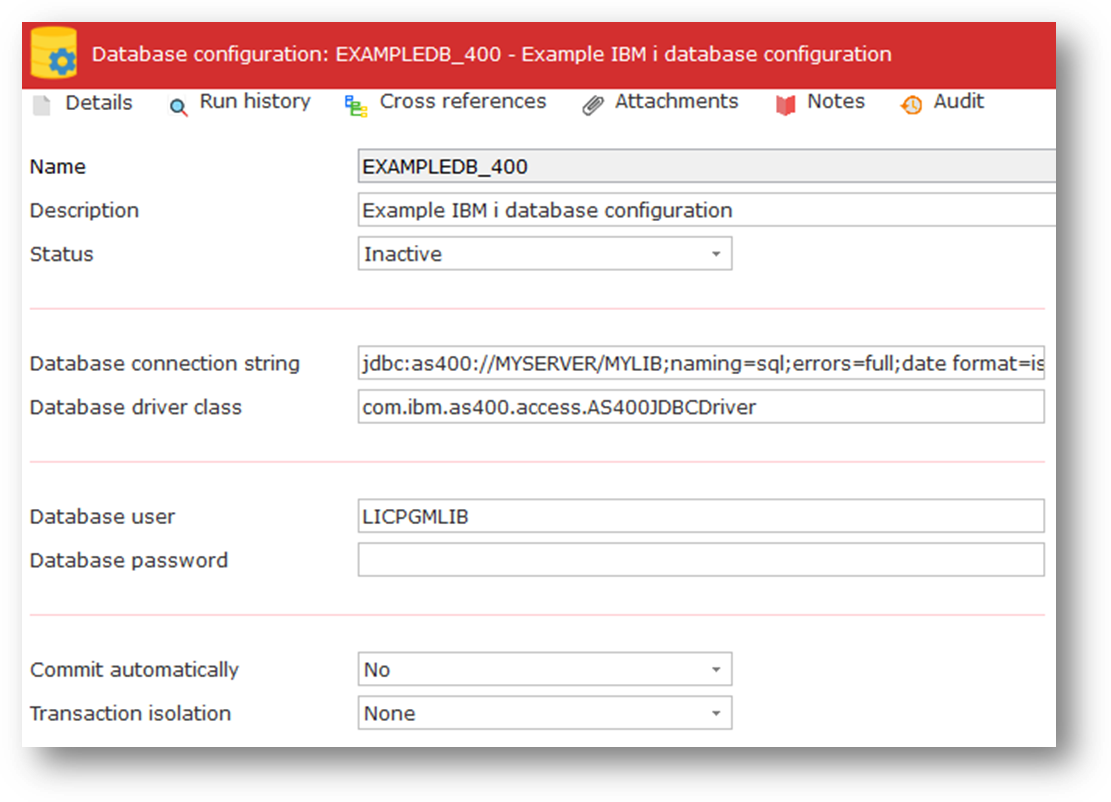
The database configuration is used to contain the details necessary for establishing a database connection for use with the SQL Database Activities or with a Transformation Map that is prepared to execute as a Java executable file (.JAR).
| Note: Transformation maps prepared to execute as MapForce Server execution files (.MFX) do NOT use database configurations, even if they do use database components. Instead, the database connection details specified in the map (or in a specified global resource) are used at run-time. For more information, refer to Transformation Map Executable Files. |
In the case of a Transformation Map (prepared to execute as a Java executable file), if the map makes use of a database as input or output, its parameters will include one for the database connection. You provide the connection to the required database by specifying a database configuration name in this parameter.
Refer to Transformation Maps for more information on defining and using Transformation Maps.
For more information about establishing database connections for use with LANSA Composer, refer to Connecting to Databases in Transformation Maps.
When you create a new Database Configuration you will be prompted to use the Database Connection Helper
This is only recommended to be used for new Connections but can also be used with existing connections.
The information that must be supplied for a database configuration is described below:
ID | An identifier to uniquely identify this Configuration. To make use of a database Configuration, you will specify this name as the value for the DBCONFIG parameter of the SQL_CONNECT activity or for the database connection parameter for a Transformation Map. |
|---|---|
Description | This should describe the Configuration. |
Status | Active or Inactive. Configurations cannot be used in a processing sequence while they are in inactive status – supplied activities will end in error if they attempt to use a configuration that has inactive status. |
Database connection string | Specifies the JDBC connection string necessary to connect to the required database from the environment in which the Processing Sequence will run. The following are examples of JDBC connection strings for, respectively, an IBM i and an MS SQL Server database: jdbc:as400://SYSNAME/LIBNAME;naming=sql;errors=full;date format=iso;true autocommit=true;translate binary=true |
| When your transformation map uses database components that connect to IBM i DB2 database tables, LANSA Composer will remove the library qualifier from the generated Java code when you prepare the transformation map as a Java executable (.JAR) file. You must setup your database configuration so that the required files can be found at run-time. Usually this is done by specifying the library name as part of the URL in the JDBC connection string - in the example shown, LIBNAME represents the library name. For more information, refer to Additional Considerations for Transformation Maps Using IBM i DB2. |
Database driver class | Identifies the Java class name of the JDBC driver used with this connection. The following are example class names for the drivers commonly used to access, respectively, IBM i and MSSQL Server databases. com.ibm.as400.access.AS400JDBCDriver |
|---|---|
Database user | If authentication is required, this contains the authentication user name. If you are using Windows integrated authentication with a Microsoft SQL Server database, then this should be left empty. |
Database password | If authentication is required, this contains the password which is used with the database user. If you are using Windows integrated authentication with a Microsoft SQL Server database, then this should be left empty. |
Commit automatically | This indicates if information should be automatically committed to the database using auto-commit support in the driver and/or database server. Depending on the particular database and driver, auto-commit can make every SQL statement a transaction. Note that this can defeat transaction control implemented at the application layer, for example, if the Use Transactions option is checked in the mapping tool. Commitment control can also be affected or controlled using options in the transformation map definition and in the JDBC connection string. You would usually only use this setting when transaction control has not been implemented in the transformation map definition. These considerations, however, can vary according to the database system and the JDBC database driver. |
Transaction isolation | The level of transaction isolation to be applied to the database connection. None Read uncommitted Read committed This level is obviously more restrictive than the Read uncommitted. Repeatable read This is more restrictive than Read committed. Serializable |