To review or change the outbound numbering for a trading partner definition, select the required trading partner in the trading partners list and then click the Outbound Numbering tab in the command handler area.
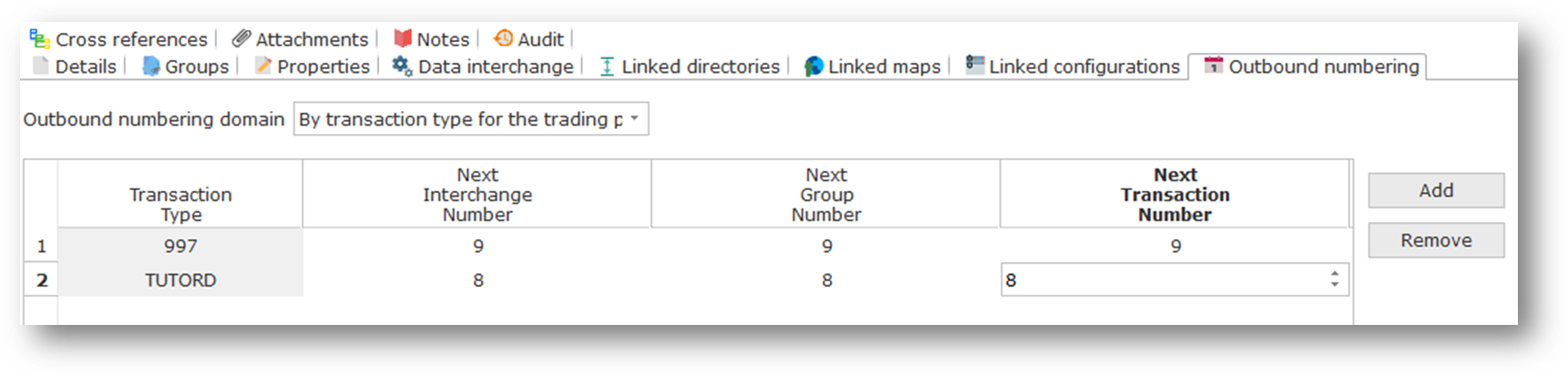
Outbound numbering is used to allocate control numbers for outbound transaction documents. As supplied, LANSA Composer's transaction document processing framework uses outbound numbering as follows:
- The TXDOC_ALLOCCTRL activity uses the outbound numbering values for the specified trading partner to allocate the requested control numbers.
- Supplied export processors for selected EDI transactions (currently just X12 997 acknowledgement) use the outbound numbering values for the trading partner to allocate interchange, group and transaction control numbers for the outbound transaction(s).
The API for allocating the control numbers is available for custom export processors to use. - When a pending outbound transaction document is registered using the TXDOC_REGOUTBND or TXDOC_REGOUTX12 activities or the supplied APIs, LANSA Composer uses the outbound numbering values for the trading partner to allocate the necessary control numbers.
Using the Outbound numbering domain drop-down list, you can choose, by trading partner, to allocate outbound transaction document control numbers in one of two ways:
- By trading partner (all transactions): Control numbers for this trading partner are allocated from the one series irrespective of the transaction type.
When you choose this option, the grid underneath changes to have a single line for transaction type All and you cannot add or remove entries.
- By transaction type for the trading partner: Control numbers for this trading partner are allocated from a separate series for each transaction type for which control numbers are requested.
When you choose this option, the grid underneath changes to show a line for each transaction type for which outbound control numbers have previously been requested (there may be none).
You may use the Add and Remove buttons to explicitly add entries for specified transaction types. Note, however, that it is only necessary to do so if you wish the numbering to begin at a value other than 1 (one). Otherwise LANSA Composer will automatically add entries when outbound control numbers are requested for a new transaction type.
The grid allows you to alter the next interchange, group and transaction number values one each line. Click in the required box and type the new value to change the values.
If you made any changes, remember to click Save (or press Ctrl+S) before switching elsewhere in LANSA Composer.
| Note: You should be fully aware of any auditing requirements or the requirements of your trading agreements with your trading partners before altering the next outbound control numbers. |