It depends on the approach you use.
Imagine a simple 5250 application made up of four menus (or some other common access points) and 36 other screens like this:
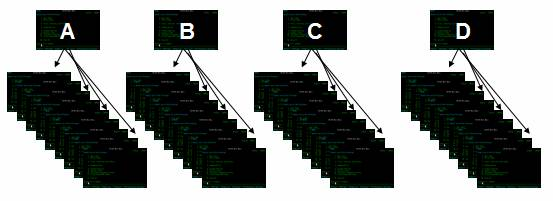
Important Note: This answer refers to RAMP stage 2 only - reusing your existing 5250 screens. It has nothing to do with RAMP stage 3 - replacing your 5250 screens with Visual LANSA components.
It depends on the approach you use.
Imagine a simple 5250 application made up of four menus (or some other common access points) and 36 other screens like this:
We recommend you use this approach:
1. Initially Perform a Rapid Navigation Modernization
In this example you would identify and define the four menus (or access points) A, B, C and D only, and snap them into RAMP as full screen destinations.
The entire 5250 application, with its modernized navigation, could now be deployed to your end users.
Normally you would also fully modernize at least some part of the application itself, to add more value to it.
At this stage answering the question "How long will it take to RAMP my application?" is easy: Allow 15 minutes per menu (or common access point). So for this example, allow 4 x 15 minutes = 1 hour.
2. Now Perform Selective and Incremental Application Modernization
Now assess application areas A, B, C and D:
Based on these assessments you might decide to:
So answering the question "How long will it take to RAMP my application?" depends upon how you approach this step.
The question cannot be answered until you decide what parts need to be fully modernized, how much work needs to be done, and in what order.
Key Points