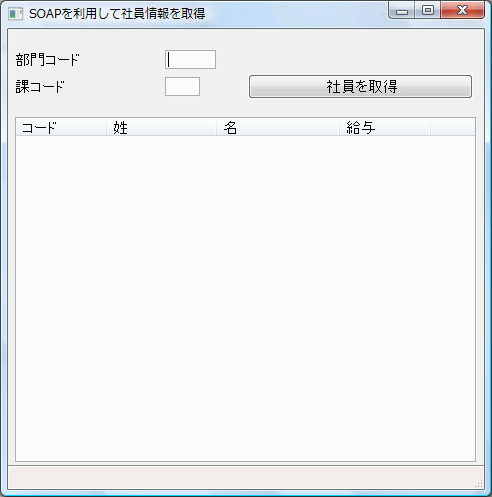
これは非常に簡単なフォームで、ユーザーは部門コードと課コードを入力して [社員を取得] というボタンをクリックします。
その後、プログラムによって該当する部門と課の社員リストが表示されます。フォームのビジュアル・デザインは以下のようになります。
Function Options(*DIRECT)Begin_Com Role(*EXTENDS #PRIM_FORM) Clientheight(460) Clientwidth(476) Height(494) Left(610) Top(120) Width(484)Define Field(#MSGDTA) Type(*CHAR) Length(132)Override Field(#empno)Override Field(#surname)Override Field(#givename)Override Field(#salary)Define_Com Class(#DEPTMENT.Visual) Name(#IN_DEPT) Displayposition(1) Height(19) Left(7) Parent(#COM_OWNER) Tabposition(1) Top(21) Usepicklist(False) Width(201)Define_Com Class(#SECTION.Visual) Name(#IN_SECT) Displayposition(2) Height(19) Left(7) Parent(#COM_OWNER) Tabposition(2) Top(48) Usepicklist(False) Width(185)Define_Com Class(#PRIM_PHBN) Name(#phbnGetEmployees) Caption('社員を取得') Displayposition(3) Left(240) Parent(#COM_OWNER) Tabposition(3) Top(45) Width(225)Define_Com Class(#PRIM_LTVW) Name(#empList) Componentversion(2) Displayposition(4) Fullrowselect(True) Height(345) Left(7) Parent(#COM_OWNER) Showsortarrow(True) Tabposition(4) Top(88) Width(461)Define_Com Class(#PRIM_LVCL) Name(#empList_1) Caption('Code') Captiontype(Caption) Displayposition(1) Parent(#empList) Source(#EMPNO)Define_Com Class(#PRIM_LVCL) Name(#empList_2) Caption('Surname') Captiontype(Caption) Displayposition(2) Parent(#empList) Source(#SURNAME) Width(24)Define_Com Class(#PRIM_LVCL) Name(#empList_3) Caption('Given Name') Captiontype(Caption) Displayposition(3) Parent(#empList) Source(#GIVENAME) Width(27)Define_Com Class(#PRIM_LVCL) Name(#empList_4) Caption('Salary') Captiontype(Caption) Displayposition(4) Parent(#empList) Source(#SALARY)Define_Com Class(#PRIM_STBR) Name(#STBR_1) Displayposition(5) Height(24) Left(0) Messageposition(1) Parent(#COM_OWNER) Tabposition(5) Tabstop(False) Top(436) Width(476)Evtroutine Handling(#com_owner.Initialize)Set Com(#com_owner) Caption(*component_desc)Endroutine*Evtroutine Handling(#phbnGetEmployees.Click)Endroutine*--------------------------------------------------------------------*サブルーチン CHECK - 例外の状態になった後* JSM ステータスを確認*--------------------------------------------------------------------Subroutine Name(CHECK) Parms((#jsmxsts *RECEIVED) (#jsmxmsg *RECEIVED))If (#jsmxsts *NE OK)*Close service and send the HTTP responseUse Builtin(JSMX_CLOSE) With_Args(#jsmxhdle1) To_Get(#jsmxsts #jsmxmsg)#MSGDTA := 'Error Status Code: ' + #JSMXSTSMessage Msgid(DCM9899) Msgf(DC@M01) Msgdta(#MSGDTA)#MSGDTA := 'Error Message: ' + #JSMXMSGMessage Msgid(DCM9899) Msgf(DC@M01) Msgdta(#MSGDTA)EndifEndroutineEnd_Com
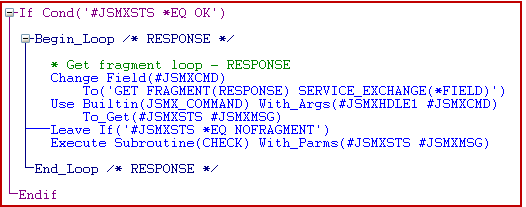
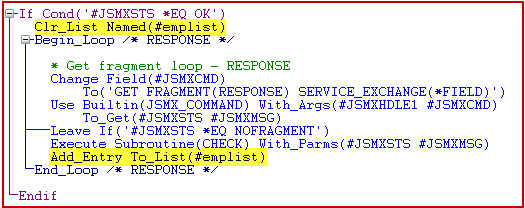
*The following fields are used by the soap binding map*#DEPTMENT....*Close serviceUSE BUILTIN(JSMX_CLOSE) WITH_ARGS(#JSMXHDLE1) TO_GET(#JSMXSTS #JSMXMSG)EXECUTE SUBROUTINE(CHECK) WITH_PARMS(#JSMXSTS #JSMXMSG)
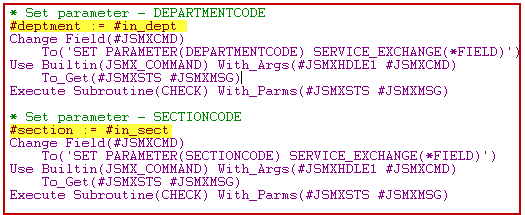
*Open SOAP ServiceChange Field(#JSMXCMD) To('OPEN SERVICE(IIIEMPLOYEEAGENT)')