In this example you create a property sheet that shows how you define the list and add entries with both simple values and with picklists:
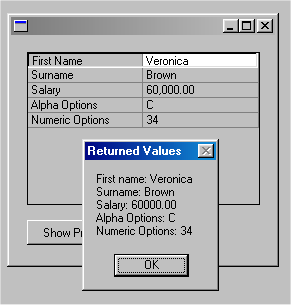
Code for the Property Sheet Example
Copy and paste this code to a form and then compile and execute the form:
FUNCTION options(*DIRECT)
BEGIN_COM height(254) left(375) top(161) width(272)
DEFINE_COM class(#PRIM_PROP) name(#PROP_1) busyupdatesofparent(True) columnbuttons(False) displayposition(1) dragstyle(Aggregated) height(153) left(16) parent(#COM_OWNER) rowheight(15) tabposition(1) top(16) visualstyleofparent(False) width(233)
DEFINE_COM class(#PRIM_PHBN) name(#PHBN_1) caption('Show Properties') displayposition(2) left(16) parent(#COM_OWNER) tabposition(2) top(184) width(105)
DEFINE_COM class(#PRIM_PRCL) name(#PRCL_1) displayposition(1) parent(#PROP_1) source(#PROPERTY) width(50)
DEFINE_COM class(#PRIM_PRCL) name(#PRCL_2) displayposition(2) parent(#PROP_1) source(#VALUE) width(20) widthtype(Remainder)
- Data class definitions for the property sheet
- Define #givename data class based on the repository field #givename
DEFINE_COM class(#GIVENAME) name(#GIVENAME) - Define #surname data class based on the elemental data class #PRIM_ALPH (string)
DEFINE_COM class(#SURNAME) name(#SURNAME) - Define #salary data class based on the repository field #salary
DEFINE_COM class(#SALARY) name(#SALARY) - Define #expenses data class based on the elemental data class #PRIM_NMBR (number)
DEFINE_COM class(#PRIM_ALPH) name(#OPTIONSA) - Define #optionsn data class based on the elemental data class #PRIM_NMBR (number)
DEFINE_COM class(#PRIM_NMBR) name(#OPTIONSN) length(9) - Pick list and pick list item definitions for the property sheet
- pick list counter (index)
DEFINE_COM class(#STD_COUNT) name(#CUR_PLIST) - pick list item counter (index)
DEFINE_COM class(#STD_COUNT) name(#CUR_PITEM) - collection of pick lists (shown inside the property sheet)
DEFINE_COM class(#PRIM_KCOL) name(#PL_COL) collects(#PRIM_PKLT) keyedby(#STD_COUNT) - collection of pick list items
DEFINE_COM class(#PRIM_KCOL) name(#PI_COL) collects(#PRIM_PKIT) keyedby(#STD_COUNT) - Add new picklist
SUBROUTINE name(ADD_PLIST) - give the new pick list an index number
CHANGE field(#CUR_PLIST) to('#Cur_PList + 1')
ENDROUTINE - Add new picklist item
SUBROUTINE name(ADD_PITEM) parms((#PROPERTY *RECEIVED) (#VALUE *RECEIVED)) - give the new pick list item an index number
CHANGE field(#CUR_PITEM) to('#Cur_PItem + 1') - Set the caption and the value of the item plus assign it into the picklist
SET com(#PI_Col<#Cur_PItem>) caption(#property) default(True) value(#value) parent(#PL_COL<#Cur_PList>)
ENDROUTINE - fill the property sheet
EVTROUTINE handling(#prop_1.Initialize) options(*NOCLEARMESSAGES *NOCLEARERRORS) - set values for the entries
CHANGE field(#GIVENAME) to('''Veronica''')
SET com(#surname) value('Brown')
CHANGE field(#SALARY) to(60000) - Add an alphanumeric entry based on the data class of the field - First Name
CHANGE field(#PROPERTY) to('''First Name''')
CHANGE field(#VALUE) to(#GIVENAME)
ADD_ENTRY to_list(#PROP_1)
SET com(#prop_1.CurrentItem) dataclass(#givename) - Add an alphanumeric entry based on the data class of the field - Surname
CHANGE field(#PROPERTY) to('''Surname''')
CHANGE field(#VALUE) to(#surname)
ADD_ENTRY to_list(#PROP_1)
SET com(#prop_1.CurrentItem) dataclass(#surname) - Add a numeric entry based on the data class of the field - Salary
CHANGE field(#PROPERTY) to('''Salary''')
CHANGE field(#VALUE) to('#SALARY.TEXT')
ADD_ENTRY to_list(#PROP_1)
SET com(#prop_1.CurrentItem) dataclass(#salary) - Create picklist with three items and add it to an alphanumeric entry - Alpha Options
EXECUTE subroutine(ADD_PLIST)
EXECUTE subroutine(ADD_PITEM) with_parms('A' 'option A')
EXECUTE subroutine(ADD_PITEM) with_parms('B' 'option B')
EXECUTE subroutine(ADD_PITEM) with_parms('C' 'option C')
CHANGE field(#PROPERTY) to('''Alpha Options''')
SET com(#optionsa) picklist(#PL_COL<#Cur_PList>)
CHANGE field(#VALUE) to('#OPTIONSA.TEXT')
ADD_ENTRY to_list(#PROP_1)
SET com(#prop_1.CurrentItem) dataclass(#optionsa) - Create picklist with three items and add it to a numeric entry - Numeric Options
EXECUTE subroutine(ADD_PLIST)
EXECUTE subroutine(ADD_PITEM) with_parms('1001' '1001')
EXECUTE subroutine(ADD_PITEM) with_parms('220' '220')
EXECUTE subroutine(ADD_PITEM) with_parms('34' '34')
CHANGE field(#PROPERTY) to('''Numeric Options''')
SET com(#optionsn) picklist(#PL_COL<#Cur_PList>)
CHANGE field(#VALUE) to('#OPTIONSN.TEXT')
ADD_ENTRY to_list(#PROP_1)
SET com(#prop_1.CurrentItem) dataclass(#optionsn)
ENDROUTINE
EVTROUTINE handling(#PHBN_1.Click)
USE builtin(MESSAGE_BOX_ADD) with_args('First name: ' #GIVENAME)
USE builtin(MESSAGE_BOX_ADD) with_args('Surname: ' #SURNAME)
USE builtin(MESSAGE_BOX_ADD) with_args('Salary: ' #SALARY)
USE builtin(MESSAGE_BOX_ADD) with_args('Alpha Options: ' #OPTIONSA.TEXT)
USE builtin(MESSAGE_BOX_ADD) with_args('Numeric Options: ' #OPTIONSN.TEXT)
USE builtin(MESSAGE_BOX_SHOW) with_args(' ' ' ' ' ' 'Returned Values')
ENDROUTINE
END_COM
Property Sheet Notes
Assigning the Value
Note that when you are setting the value of the #Value column and the the data class of the entry is based on #PRIM_ALPH, #PRIM_NMBR or a numeric field, you must use the Text property of the component.
CHANGE field(#PROPERTY) to('''Salary''')
CHANGE field(#VALUE) to('#SALARY.TEXT')
ADD_ENTRY to_list(#PROP_1)
SET com(#prop_1.CurrentItem) dataclass(#salary)
Returning a Value
When you are returning a value from the property sheet, you must use the Value or Text properties of the data classes based on #PRIM_ALPH or #PRIM_NMBR:
USE builtin(MESSAGE_BOX_ADD) with_args('First name: ' #GIVENAME)
USE builtin(MESSAGE_BOX_ADD) with_args('Last name: ' #SURNAME)
USE builtin(MESSAGE_BOX_ADD) with_args('Salary: ' #SALARY)
USE builtin(MESSAGE_BOX_ADD) with_args('Alpha Options: ' #OPTIONSA.TEXT)
USE builtin(MESSAGE_BOX_ADD) with_args('Numeric Options: ' #OPTIONSN.TEXT)