This example contains a tree view of departments, sections and employees. You can move employees between sections by drag and drop.
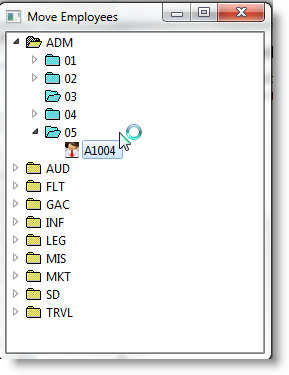
Source for the Employee Drag and Drop Tree
Copy and paste this code to a form and compile and execute it. Note that you must have the Source for the DD_EMPPL Payload in a compiled reusable part for this example to work.
FUNCTION options(*DIRECT)
BEGIN_COM role(*EXTENDS #PRIM_FORM) CAPTION('Move Employees') HEIGHT(359) LAYOUTMANAGER(#ATLM_1) LEFT(304) TOP(112) WIDTH(274)
DEFINE_COM class(#PRIM_ATLM) name(#ATLM_1)
DEFINE_COM class(#PRIM_TRVW) name(#TRVW_1) DISPLAYPOSITION(1) DRAGSTYLE(Automatic) HEIGHT(332) LEFT(0) PARENT(#COM_OWNER) TABPOSITION(1) TOP(0) WIDTH(266)
DEFINE_COM class(#PRIM_TVCL) name(#TVCL_1) DISPLAYPOSITION(1) KEYPOSITION(1) LEVEL(1) PARENT(#TRVW_1) SORTPOSITION(1) SOURCE(#DEPTMENT)
DEFINE_COM class(#PRIM_TVCL) name(#TVCL_2) DISPLAYPOSITION(1) KEYPOSITION(1) LEVEL(2) PARENT(#TRVW_1) SORTPOSITION(1) SOURCE(#SECTION)
DEFINE_COM class(#PRIM_TVCL) name(#TVCL_3) DISPLAYPOSITION(1) KEYPOSITION(1) LEVEL(3) PARENT(#TRVW_1) SORTPOSITION(1) SOURCE(#EMPNO)
DEFINE_COM class(#PRIM_ATLI) name(#ATLI_1) ATTACHMENT(Center) MANAGE(#TRVW_1) PARENT(#ATLM_1)
DEFINE_COM class(#PRIM_STBR) name(#STBR_1) DISPLAYPOSITION(2) HEIGHT(24) LEFT(0) MESSAGEPOSITION(1) PARENT(#COM_OWNER) TABPOSITION(2) TABSTOP(False) TOP(308) WIDTH(266)
DEFINE_COM class(#PRIM_ATLI) name(#ATLI_4) ATTACHMENT(Bottom) PARENT(#ATLM_1)
- Employee Payload object
DEFINE_COM class(#dd_emppl) name(#PAYLOAD) reference(*dynamic)
DEFINE field(#W_EMPNO) reffld(#EMPNO)
DEFINE field(#W_DEPT) reffld(#DEPTMENT)
DEFINE field(#W_SECT) reffld(#SECTION)
EVTROUTINE handling(#com_owner.CreateInstance) options(*NOCLEARERRORS *NOCLEARMESSAGES) - Tree view images
SET com(#tvcl_1) IMAGE(#vi_foldcl) IMAGEEXPANDED(#vi_foldop)
SET com(#tvcl_2) IMAGE(#vi_sectcl) IMAGEEXPANDED(#vi_sectop)
SET com(#tvcl_3) IMAGE(#vi_employ) - Populate Tree
SELECT fields(#TRVW_1) from_file(DEPTAB)
SELECT fields(#TRVW_1) from_file(SECTAB) with_key(#DEPTMENT)
SELECT fields(#TRVW_1) from_file(PSLMST1) with_key(#DEPTMENT #SECTION)
ADD_ENTRY to_list(#TRVW_1)
ENDSELECT
ENDSELECT
ENDSELECT
ENDROUTINE - Start the drag operation.
- Only allow employees to be "dragged"
EVTROUTINE handling(#TRVW_1.StartDrag) options(*NOCLEARMESSAGES *NOCLEARERRORS) CONTINUE(#continue)
USE builtin(CLR_MESSAGES) - Create Payload Instance
SET_REF com(#payload) to(*create_as #dd_emppl) - Only allow employee to be dragged
IF cond('#Trvw_1.currentitem.level = 3') - Add item to the payload
INVOKE method(#Payload.Add_to_payload) EMPLOYEE_ID(#empno) EMPLOYEE_DEPARTMENT(#deptment) EMPLOYEE_SECTION(#section)
ELSE
SET com(#continue) VALUE(false)
ENDIF
ENDROUTINE
EVTROUTINE handling(#TRVW_1.DragOver) options(*NOCLEARERRORS *NOCLEARMESSAGES) ACCEPTDROP(#acceptdrop) SHOWDROPHILIGHT(#ShowHilight) - Show Item dragged over
SET com(#showhilight) VALUE(true) - If a department, employee cannot be dropped
IF_REF com(#trvw_1.currentitem) is_not(*null)
IF cond('(#trvw_1.currentitem.level *ne 1)') - Allow drop and set new cursor
SET com(#acceptdrop) VALUE(true)
ELSE - Disable drop
SET com(#acceptdrop) VALUE(False)
ENDIF
ENDIF
ENDROUTINE
EVTROUTINE handling(#TRVW_1.DragDrop) options(*NOCLEARERRORS *NOCLEARMESSAGES) - If the payload is not empty, get the payload item and add to the treeview in the new section
IF cond('#Payload.Payload_Items *ne *zero') - Return values in to working fields fields to compare with current item values
INVOKE method(#Payload.Get_Payload_Item) PAYLOAD_ITEM(1) EMPLOYEE_ID(#empno) EMPLOYEE_DEPARTMENT(#w_dept) EMPLOYEE_SECTION(#w_sect) - If the department and/or section have changed, do the drop
IF cond('(#deptment *ne #W_dept) or (#section *ne #w_sect)') - Department and section values of currentitem are used
ADD_ENTRY to_list(#TRVW_1)
MESSAGE msgtxt(' Drop Successful') - Expand Parent items of new drop point
- As drop can only happen on a section, department must be expanded
CHANGE field(#W_DEPT) to(#DEPTMENT)
CHANGE field(#W_SECT) to(#section)
SELECTLIST named(#TRVW_1)
CONTINUE if('#w_dept *ne #deptment')
CONTINUE if('#w_sect *ne #section')
SET com(#trvw_1.currentitem) EXPANDED(true)
LEAVE
ENDSELECT
ENDIF
ENDIF
ENDROUTINE
EVTROUTINE handling(#TRVW_1.EndDrag) options(*NOCLEARERRORS *NOCLEARMESSAGES) DRAGRESULT(#DragResult)
IF cond('#Dragresult.value = Accepted') - If the department and/or section have changed delete the source employee
IF cond('(#deptment *ne #w_dept) or (#section *ne #w_sect)') - Get payload item details
INVOKE method(#Payload.Get_Payload_Item) PAYLOAD_ITEM(1) EMPLOYEE_ID(#w_empno) EMPLOYEE_DEPARTMENT(#w_dept) EMPLOYEE_SECTION(#w_sect) - Locate and Delete source employee
SELECTLIST named(#TRVW_1)
CONTINUE if('#w_dept *ne #deptment')
CONTINUE if('#w_sect *ne #section')
CONTINUE if('#w_empno *ne #empno')
DLT_ENTRY from_list(#TRVW_1)
LEAVE
ENDSELECT
ENDIF
ENDIF
ENDROUTINE
END_COM