This step will create entries in the combo box and set one search field as visible. The combo box ItemGotSelection event will show and hide the search fields.
1. Create a subroutine with name InitForm
2. Add code to set values for STD_DESCS and STD_CODEL and add three entries to the combo box. Position the combo box to the entry for By Name initially:
Subroutine Name(InitForm)
Clr_List Named(#ComboBox1)
#STD_CODEL := NAME
#std_descs := 'By Name'
Add_Entry To_List(#ComboBox1)
#STD_CODEL := DATE
#std_descs := 'Start Date'
Add_Entry To_List(#ComboBox1)
#STD_CODEL := DEPT
#std_descs := 'By Department'
Add_Entry To_List(#ComboBox1)
Get_Entry Number(1) From_List(#ComboBox1)
#ComboBox1.CurrentItem.Focus := true
Endroutine
Note: The commands to Get_Entry and Set focus position of the combo box to the first entry added, (NAME).
3. Extend the InitForm subroutine to show iiiSearchName and hide SearchDate and SearchDepartment.
#iiiSearchName. Visible := True
#SearchDepartment.visible #SearchDate.visible := false
4. Add code to execute the subroutine InitForm from the form's CreateInstance event.
Evtroutine Handling(#com_owner.CreateInstance)
Set Com(#com_owner) Caption(*component_desc)
Execute Subroutine(InitForm)
Endroutine
5. Using a CASE/ENDCASE loop for field STD_CODEL, add code to the combo box ItemGotSelection event to show and hide the search fields depending on the value selected.
Evtroutine Handling(#ComboBox1.ItemGotSelection) Options(*NOCLEARMESSAGES *NOCLEARERRORS)
Case Of_Field(#std_codel)
When (= NAME)
#iiiSearchName.Visible := true
#SearchDate.Visible #SearchDepartment.Visible := false
When (= DATE)
#SearchDate.Visible := true
#SearchDepartment.Visible #iiiSearchName.Visible := false
When (= DEPT)
#SearchDepartment.visible := true
#iiiSearchName.Visible #SearchDate.Visible := false
Endcase
Endroutine
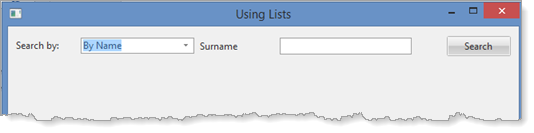
6. Compile and test the form. Your form should look like the following:
Changing the Search by dropdown should display the correct search field.